Live 镜像
试用新版 Plasma 桌面环境的最简单方法是使用新版 Live 镜像系统从 U 盘启动。我们还提供了 Docker 镜像方便用户测试。
下载预装了 Plasma 的 Live 镜像 下载预装了 Plasma 的 Docker 镜像2026年 6 月 16 日 星期二
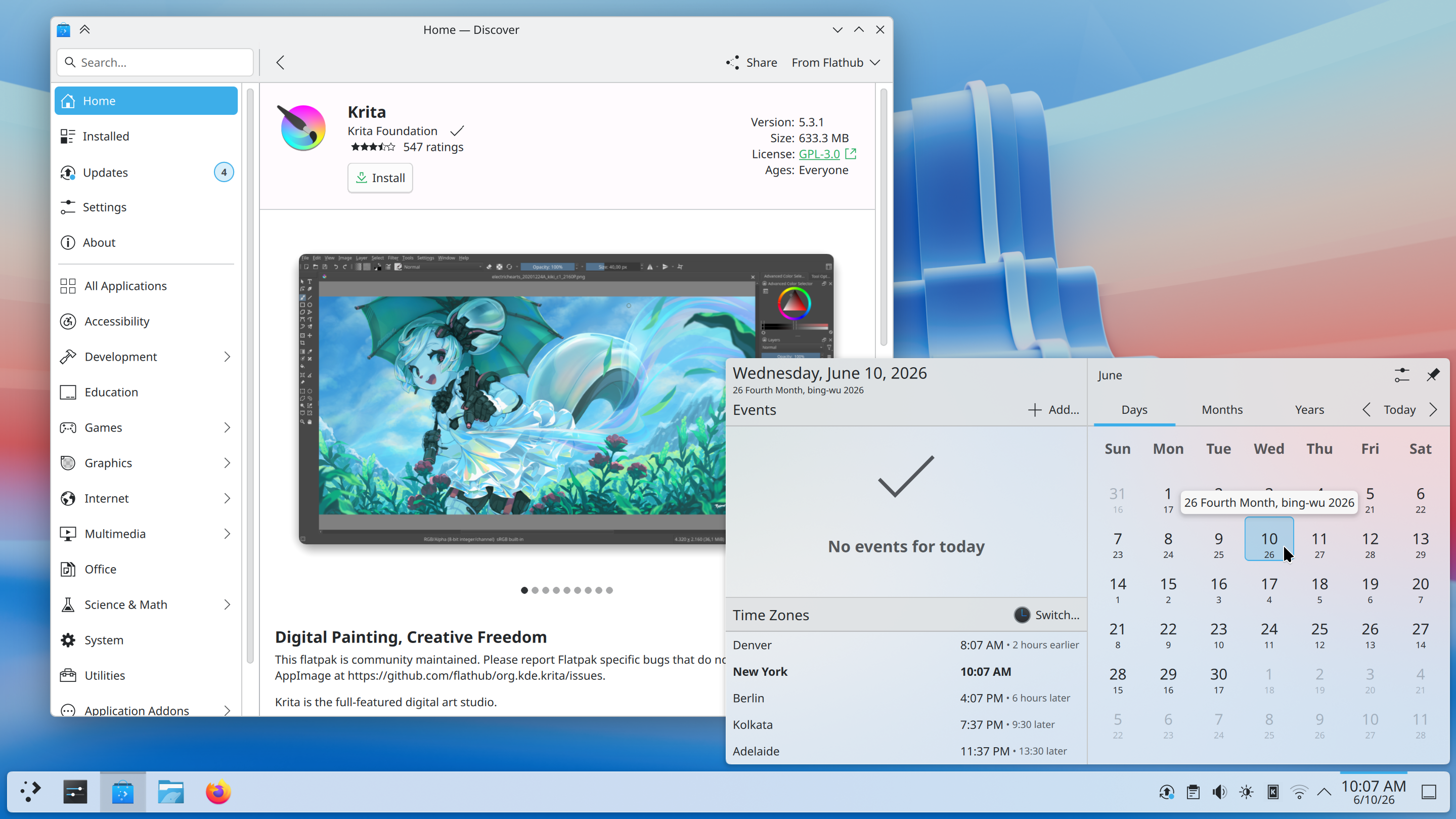
Plasma 6.7 brings powerful new features to KDE’s classic desktop, and refines its user experience to new levels.
尽情体验精心设计、直击痛点的改进,抢先一睹未来主题美学的风采,享受更出色的性能,还有更多惊喜。
继续往下读,一探究竟吧!
历经21年,希望这份等待值得……每屏幕独立虚拟桌面,终于来了!
再也不怕别人嫌你声音大或小,也不用猜到底是麦克风坏了还是软件在作怪。
启用 Plasma 虚拟键盘后,长按某个按键即可输入与之对应的特殊字符。
Plasma 6.6 已支持创建属于您自己的全局主题,并随昼夜循环自动切换。而 Plasma 6.7 赋予您更多控制权,通过快捷开关即可在浅色与深色全局主题之间即时切换。
Plasma 6.7 在其支持的非公历日历中加入了越南阴历,让您能比以往更轻松地同时使用两种历法来记录日期与安排活动。

The System Tray is already the place for monitoring apps running in the background using traditional methods. Plasma 6.7 extends this support by also showing apps using the newer “Background Apps” system, which is more common for apps using the Flatpak package format.
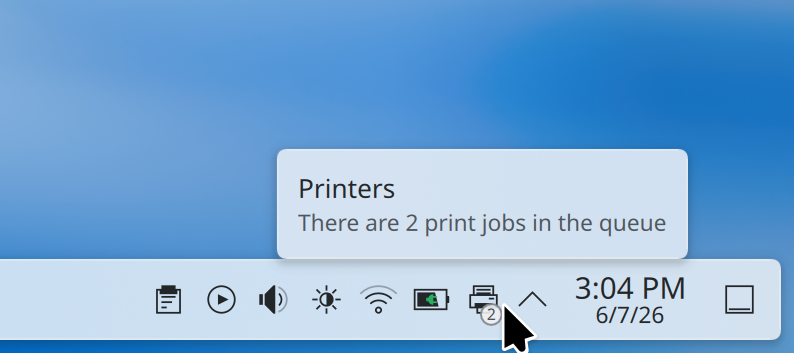
Plasma 的打印支持日趋成熟。如今,打印机的 系统托盘 图标会通过一个小角标显示活跃的打印任务数量。
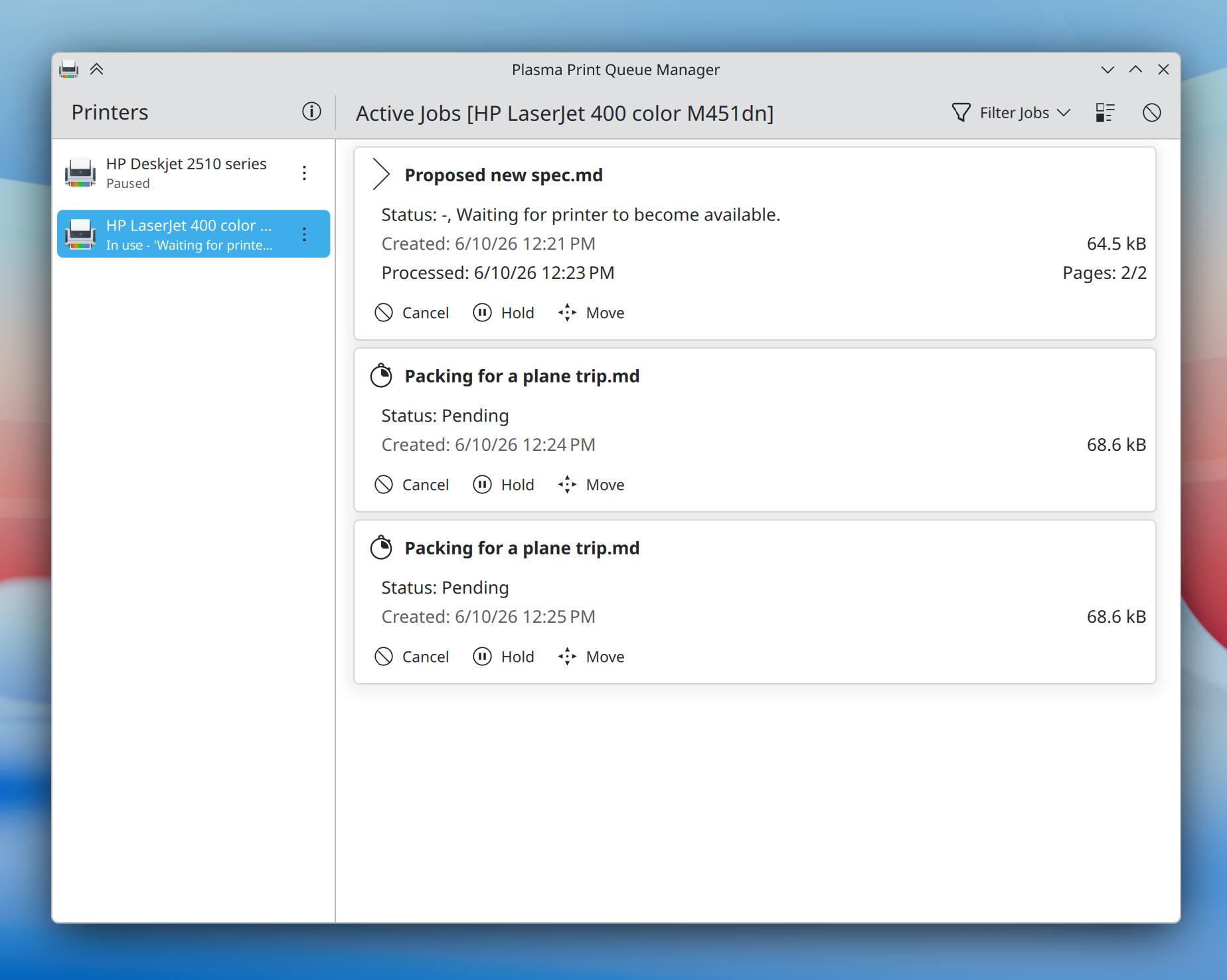
在企业端,Plasma 6.7 大幅简化了连接 Windows 网络共享打印机的流程,全新的打印队列管理工具为管理多台打印机的人带来了前所未有的强大功能——同时仍足够简单易懂,家庭用户也能轻松上手。
Plasma 6.7 特别注重打磨桌面体验,让日常操作更加便捷。以下只是其中一小部分:
当您按下 Meta + W 打开概览屏幕时,Plasma 6.7 让您只需滚动滚轮或按下 Page Up 或 Page Down 键即可切换虚拟桌面。
It’s now easier than ever to add or remove favorite apps in the Application Launcher, Application Menu, and Application Dashboard widgets: just drag and drop!
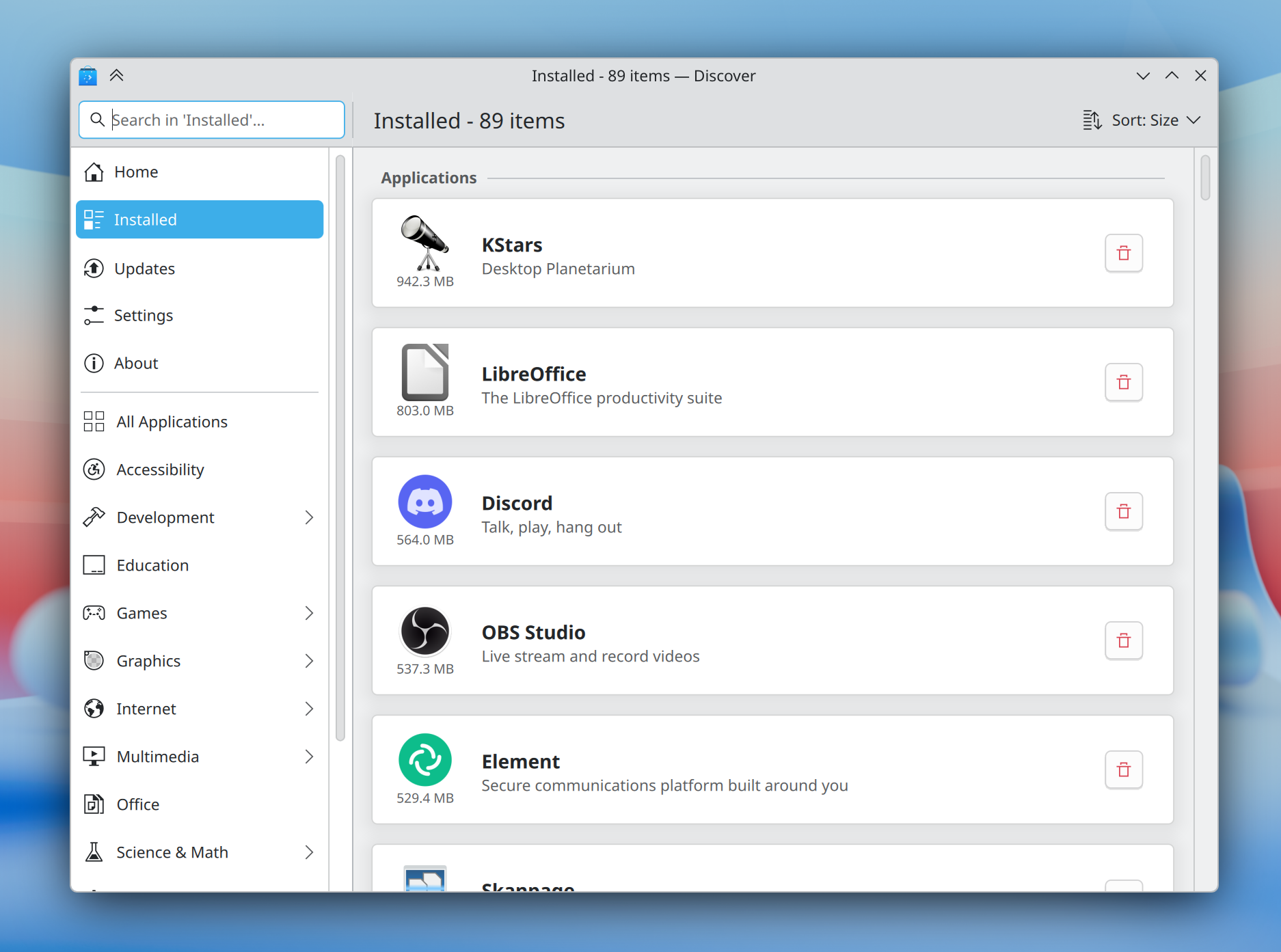
The Discover software center now features a more obvious “Install” button and redesigned app cards with more information, plus a more intuitive sorting order.
In addition, installed software is now grouped by type, making it easier than ever to find what you’re looking for.
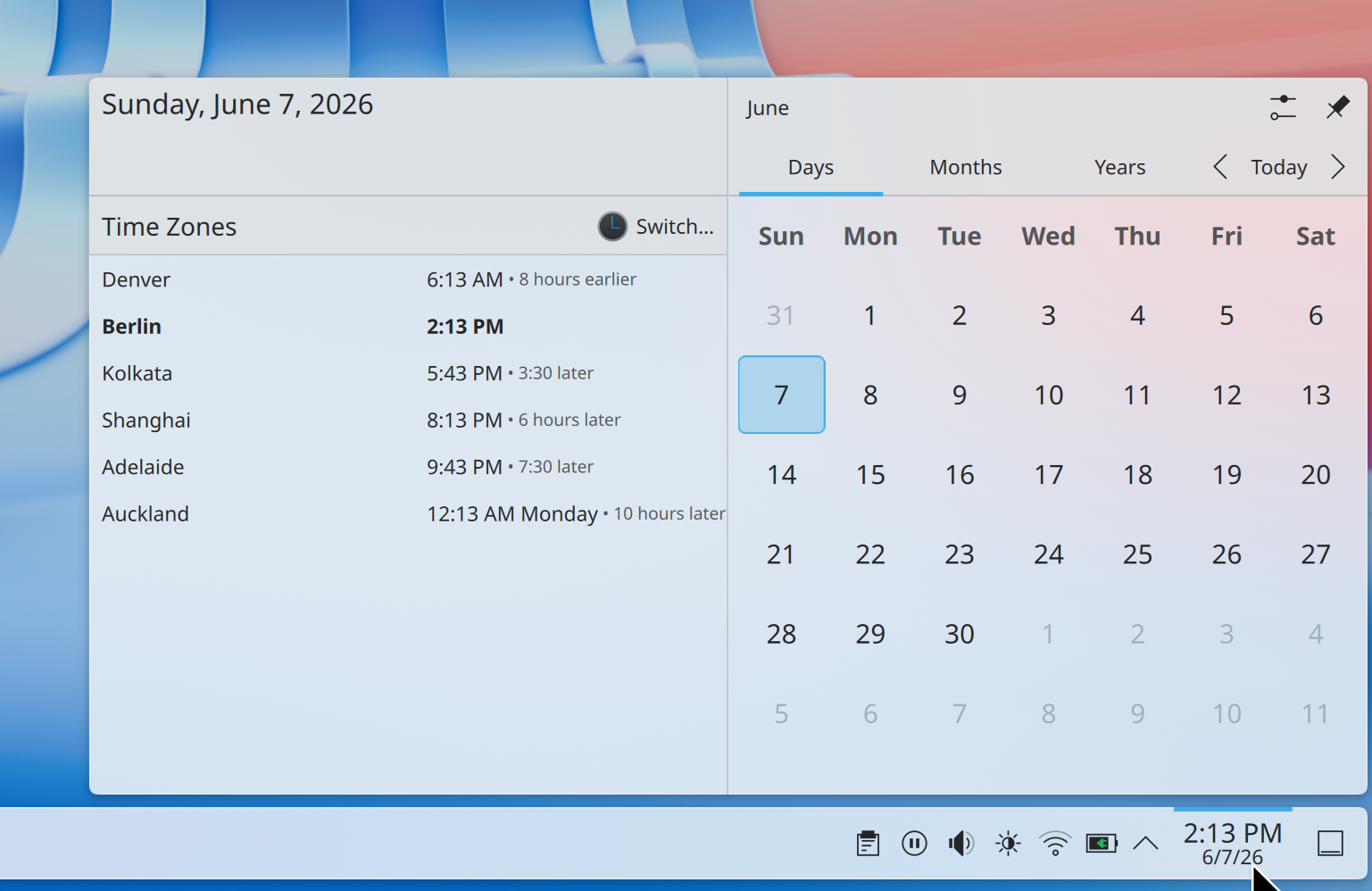
How much earlier is it in Denver if you’re in Berlin? No longer will a question like this require mental gymnastics; Plasma 6.7 makes it easy to see how many hours earlier or later it is in each time zone shown in the Digital Clock widget compared to your local time zone.
For power users, the desktop layout now supports switching to “type-ahead” mode for quickly selecting files when typing on the desktop. You can change this back to activating KRunner if you prefer by Right-clicking on desktop and selecting Desktop and Wallpaper → Icons → Typing on the desktop from the pop-up menu.
In preparation for KDE’s 30th anniversary later this year, we’ve brought the Oxygen theme — used by default in KDE 4 — back up to par with the current Breeze theme.
Air, the Plasma Style providing a light version of Oxygen, has also returned, and we’ve reworked our Global Themes to feature light, dark, and twilight versions. Both Air and Oxygen benefit from a multitude of fixes, improvements, and restorations, including support for adaptive opacity, different panel positions, and more.
The classic KDE 4 Air and Horos wallpapers also make a return.
The default Breeze theme also continues to evolve, now featuring rounded list and grid view highlights for many applications, and visible click effects for menu items.

Plasma’s Notifications have been given a fancier animation: they now slide in from the nearest screen edge. This makes them more visually prominent and less likely to be missed, while at the same time avoiding being too attention-grabbing.
Though Plasma’s theming capabilities are second to none, for years creating those themes has been a difficult and fragmented experience.
Plasma’s all-new Union theming system intends to streamline theming by making it possible to style Plasma, QtQuick apps, and QtWidgets apps all with a single set of easy-to-write CSS — the world’s most popular and documented open standard for this purpose.
Plasma 6.7 marks the inaugural release of Union, here with a tech preview of the QtQuick style.
Union is under heavy development, and hence off by default. To test it out, make sure the union package is installed (name may differ depending on your OS), and select “Union” in System Settings → Colors & Themes → Application Style.
Applications must be restarted in order to use Union, and are expected to look nearly identical to Breeze.
If you’ve found a Union-specific issue, please report it here.
You can find out more about the current state and future plans for Union on its developer’s blog.
Plasma has always offered a superb graphical experience, and 6.7 piles on further improvements.
No longer do you have to choose between color management using an ICC profile or enjoying HDR content; now both are possible at the same time!
In addition, you can now control whether the colors on the screen turn redder at extremely low brightness levels on many AMD laptops.
Finally, the team put a great deal of work into optimization, resulting in better performance and lower power usage for CPU-rendered apps, many full-screen windows, and integrated Intel GPUs.
Plasma 6.7 has even more to offer, including:
To see a high-level overview of all user-facing changes, see the Plasma 6.7 wiki page.
To see the full list of all changes, read the complete changelog.
Plasma 6.7 is dedicated to Eric Laffoon, who passed away in May.
Eric was a longtime supporter of KDE going back decades, offering up his time, money, bug reports, and advocacy.
Eric is sorely missed, and we dedicate this release to him.
试用新版 Plasma 桌面环境的最简单方法是使用新版 Live 镜像系统从 U 盘启动。我们还提供了 Docker 镜像方便用户测试。
下载预装了 Plasma 的 Live 镜像 下载预装了 Plasma 的 Docker 镜像发行版已经打包或正在打包那些在我们的百科页面上列出的软件包。
提示:在此公告发布时,并非所有发行版都能立即提供最新版软件。
软件包下载百科页面您可以直接从源代码安装 KDE Plasma 。
社区编写的编译指南 源代码信息页面您可以在 KDE 论坛上讨论 KDE 的相关话题。
您可以通过 #Plasma Matrix 频道、Plasma-devel 邮件列表直接向开发者提供反馈,也可在 Bugzilla 程序缺陷跟踪平台上报告问题。如果您喜欢 Plasma 团队的成果,也请与我们分享您的喜悦之情!
我们真诚感谢您的反馈。
KDE 是一个自由软件社区,它的存续和成长有赖于众多志愿者长年累月的不懈努力。KDE 欢迎新的志愿者加入社区,也欢迎其他类型的贡献,包括代码、程序缺陷报告和修复、撰写文档、翻译、推广、资金支持等。 我们将欣然接受并衷心感谢所有这些支持。请在支持 KDE 页面了解更多相关信息。您也可以通过我们的加入游戏计划成为一位 KDE e.V. 支持会员。
KDE 是一支国际技术团队,致力于为桌面和便携式计算需求开发自由开源软件。KDE 的产品包括适用于 Linux 和 UNIX 平台的现代桌面系统、功能齐全的办公生产力套件和团队协作软件、以及涵盖了网络、多媒体、娱乐、教育、图像处理和软件开发等众多领域的数百款应用软件。KDE 软件已被翻译成 60 多种语言,并在设计时充分考虑了易用性和现代无障碍原则。KDE 的全功能应用程序能够在 Linux、BSD、Windows、Haiku 和 macOS 系统中以原生状态运行。
商标声明。
KDE® 和 K 桌面环境® 徽标是KDE e.V. 的注册商标。
Linux 是 Linus Torvalds 的注册商标。 UNIX 是 The Open Group 在美国和其他国家的注册商标。
本公告中提到的所有其他商标和版权物均为其所有者的财产。
欲了解更多信息,请向我们发送电子邮件: press@kde.org