
KDE Gear ⚙️ 26.08
“Enjoy Shiny Stuff” edition
2026年 8 月 20 日 星期四
Another four months of development and we are back with a brand new batch of apps. In KDE Gear 26.08, you’ll find updates, new features, and great tools to run and enjoy your digital life.
Today we will be examining some of the more interesting changes landing in KDE’s most popular apps.
Let’s get started!
Support KDE! Become a Supporting Member: you can contribute to keeping our projects alive, get your name into our Hall of Fame, and even Adopt an App!
Okular
Okular is KDE’s flagship document reader most commonly used for reading, signing, and annotating PDFs while also being an excellent eBook and comic reader that can also render Markdown.
In this new version, we have reinforced the signing features resulting in the process becoming more secure and streamlined. We have also melded both settings dialogs (Configure Backends and Configure Okular) into one, making everything less confusing.
More visible features include changes to the text selection: a triple click now selects a whole line, and annotations: Okular will automatically include any highlighted or underlined text in an associated note. You can also copy and paste some of your annotations (notes and inline comments) within the same document or onto another.
Dolphin
Dolphin is KDE’s powerful file/folder/server explorer. Version 26.08 goes even further and improves its integration with KDE Connect. When exploring files on your phone from Dolphin, click on the Open KDE Connect button at the top of the window to make the KDE Connect app appear.
If you are browsing a busy directory, open the Filter Bar with Ctrl + i to use plain text, globbing (like you would use with the ls command in the terminal), or Regular Expressions to sort through the files.
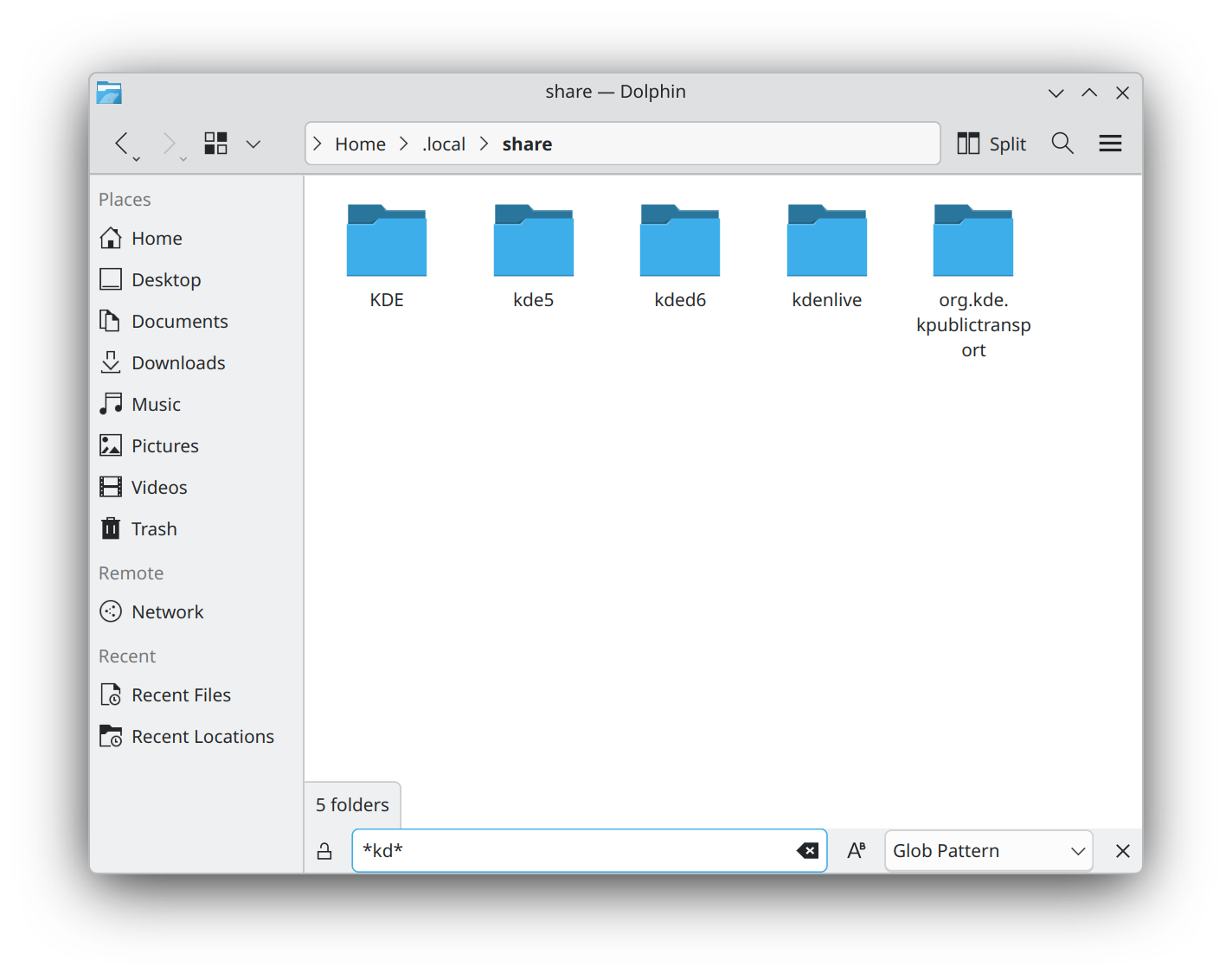
In a similar vein, you can now group files and folders independently from the sorting criterion. This means you can order files alphabetically by name and then group the files by type.
And if the number of tabs you have open gets out of hand, right click on a tab and you can chose to close the tabs to the right, left, or both.
Konsole
Konsole is KDE’s terminal emulator and comes with many features and utilities.
You can now hold down the Alt key, click on an underlined file name, and drag it somewhere else. Also, drag an image onto an image editor to open “Ready for Editing”, drag it onto a text editor and it will copy the path to the file.
The same can now be done with links, email addresses, and color terms too. Drag a link to an empty tab in your browser and it will open the page the link points to. Move the link onto a text editor, and it will download the HTML of the page ready for editing. Drag a color code onto an image in Krita and it will flood the layer with that color. Or drag the same color code onto a text editor and the color’s hexadecimal code will be typed out for you.
Kdenlive
Kdenlive is KDE’s feature-rich video editor. 26.08 comes with lots of quality of life improvements and polishing.
In the effects department for example, you can now move the Transform effect’s rotation axis wherever you want, instead of having it fixed to the center of the item you need to rotate.
The Gradient Map effect now lets you add multiple stops to a gradient, and you can now adjust the curves in the Curves (avfilter) effect independently to the get the color hues you need.
Down on the timeline, you can copy a selection to a new sequence, or have Kdenlive create audio tracks automatically as needed for your clips. You can also reorder tracks and configure different colors for each item type — video, image, title, etc.

In the Titler, you can now copy and paste objects, give rectangles rounded corners, and snap objects to the center and edges of the screen as well as to other items. This feature includes a visual guide to help you.
Minuet
Minuet is KDE’s application for music education. It helps students and musicians train their ears with exercises for intervals, chords, scales, and rhythms.
Minuet has a new interface built to work well on both desktop and mobile screens. The home page and navigation drawer make exercise categories easier to find while making the exercise browser present each activity as a card with a short description. Your current category remains highlighted, and the new search field filters exercises by their translated names and descriptions. Exercise pages have also been reorganized to use the available space better on narrow windows and phones.
完整更新日志
如何获取 KDE 应用程序
虽然我们完全支持各个发行版分发我们的软件,但 KDE Gear 26.08 的应用程序也会在不久后推送到以下的 Linux 应用程序商店:
如果您想帮助我们将更多的 KDE 应用程序发表到应用程序商店、让 KDE 支持更多应用程序商店、使应用程序更好地整合到我们的开发流程中,请在 All About the Apps 聊天室 与我们联系。
提示:在此公告发布时,并非所有发行版都能立即提供最新版软件。 软件包下载百科页面
编译 KDE Gear
KDE Gear 26.08.0 的完整源代码可以自由下载。编译和安装指南可从 KDE Gear 26.08.0 信息页面 查看。
关于 KDE
KDE 是一支国际技术团队,致力于为桌面和便携式计算需求开发自由开源软件。KDE 的产品包括适用于 Linux 和 UNIX 平台的现代桌面系统、功能齐全的办公生产力套件和团队协作软件、以及涵盖了网络、多媒体、娱乐、教育、图像处理和软件开发等众多领域的数百款应用软件。KDE 软件已被翻译成 60 多种语言,并在设计时充分考虑了易用性和现代无障碍原则。KDE 的全功能应用程序能够在 Linux、BSD、Windows、Haiku 和 macOS 系统中以原生状态运行。
商标声明。
KDE® 和 K 桌面环境® 徽标是KDE e.V. 的注册商标。
Linux 是 Linus Torvalds 的注册商标。 UNIX 是 The Open Group 在美国和其他国家的注册商标。
本公告中提到的所有其他商标和版权物均为其所有者的财产。
媒体联系方式
欲了解更多信息,请向我们发送电子邮件: press@kde.org