KDE Gear 21.04
欢迎使用 KDE Gear ⚙️ 21.04!
KDE 为工作、游戏、教育和创造性制作了大量应用程序。例如 Kontact,您可以控制您的所有电子邮件、联系人和议程;Itinerary 让您随时了解您旅行所需的一切;KAlgebra 绘图计算器在您的桌面和手机上同样运行良好;Cantor 为您提供一种直观的分析数据和绘制结果图的方式;Kdenlive使剪切和构建精密的视觉视频不仅容易,而且也很有趣。
这些只是今天发布新更新的几个应用。当和 KDE 强大的 Plasma 桌面一起时,它们为您提供最完全,如果不是全部的话,您需要的在一个多功能和灵活的 Linux 环境中生产的工具。
但您甚至不需要运行 Linux 操作系统!这次发布的许多应用程序也能在 Windows、macOS 和 Android 上运行。桌面与移动平台通用,对于 KDE 来说意义在此:随处使用您最爱的应用,在任何系统上,在您的工作电脑上、您的移动设备上或甚至您的电视上!
并请记得:KDE 的 apps, Plasma 桌面,Plasma Mobile,Plasma BigScreen 和 KDE 其他所有软件都是自由和开源的。没有许可,没有隐藏的成本,没有间谍行为。与您的朋友分享,将它们安装在工作中,或在您的学校实验室中使用。这些是您的软件,您可以随处随意享受它们。
随时阅读并发现 KDE 应用程序世界中的新内容:
Kontact
Kontact 让您控制所有您的电子邮件、地址簿和每日计划。设置会议并让 Kontact 日历在时间或日期发生变化时发送邀请和提醒参与者。 Kontact 的智能后端将会跟踪谁给您写了消息,即使您没有将他们添加到您的地址簿中。当您想回复时,他们就在您手指边。
kmail.png)
您的隐私是 Kontact 的创建者关注的大事。加密电子邮件使第三方无法对您进行间谍活动是保证您个人信息安全的最佳方式之一。但加密难以使用将意味着大多数用户都不会有任何加密。支持自动加密,在 Kontact 中的一个新功能,您能获得两个世界的最好体验:安全与方便。
Kontact_security.png)
另一个旨在维护您安全的功能是,现在您可以更详细控制查看消息时您下载的内容。虽然 Linux 操作系统很抗病毒,但您总想小心些,并且您永远无法知道只要在电子邮件中加载嵌入图像就会向第三方透露多少信息。
在设计部门,Kontact 开发者改进了整个套件的界面外观,使日历使用更加顺畅、安全更加友善、您地址簿中的联系人管理更加容易。
Kontact 在您现有的群件服务工作中不会遇到任何问题,因为它支持 Gmail、Outlook 和所有基于 POP 和 IMAP 的服务。
Itinerary 使您的旅途更加轻松和更加愉快。它在 Kontact 上运行良好,因为它可以从您与旅行公司的通信中提取信息来帮助您规划您的旅行。 尽管如此,它也可以作为一个独立的应用程序来运行。
KDE Itinerary 是 KDE 类目中的一点新成员,因为它是三年多前开始的。然而,它已经收集了大量的特色功能。除了基本时间表、位置和您选择的交通工具的时间安排,Itinerary 还能向您提供关于站和机场无障碍环境的信息,甚至告诉您什么设施将开放,使您能够规划您的沿途餐。这个新版本包括火车站地图视图中电梯和自动扶梯的实时状态,还能评估 OpenStreetMap 提供的开放时间表达式。它还包含一个功能,允许您区分有基座的和无基座的租用自行车。
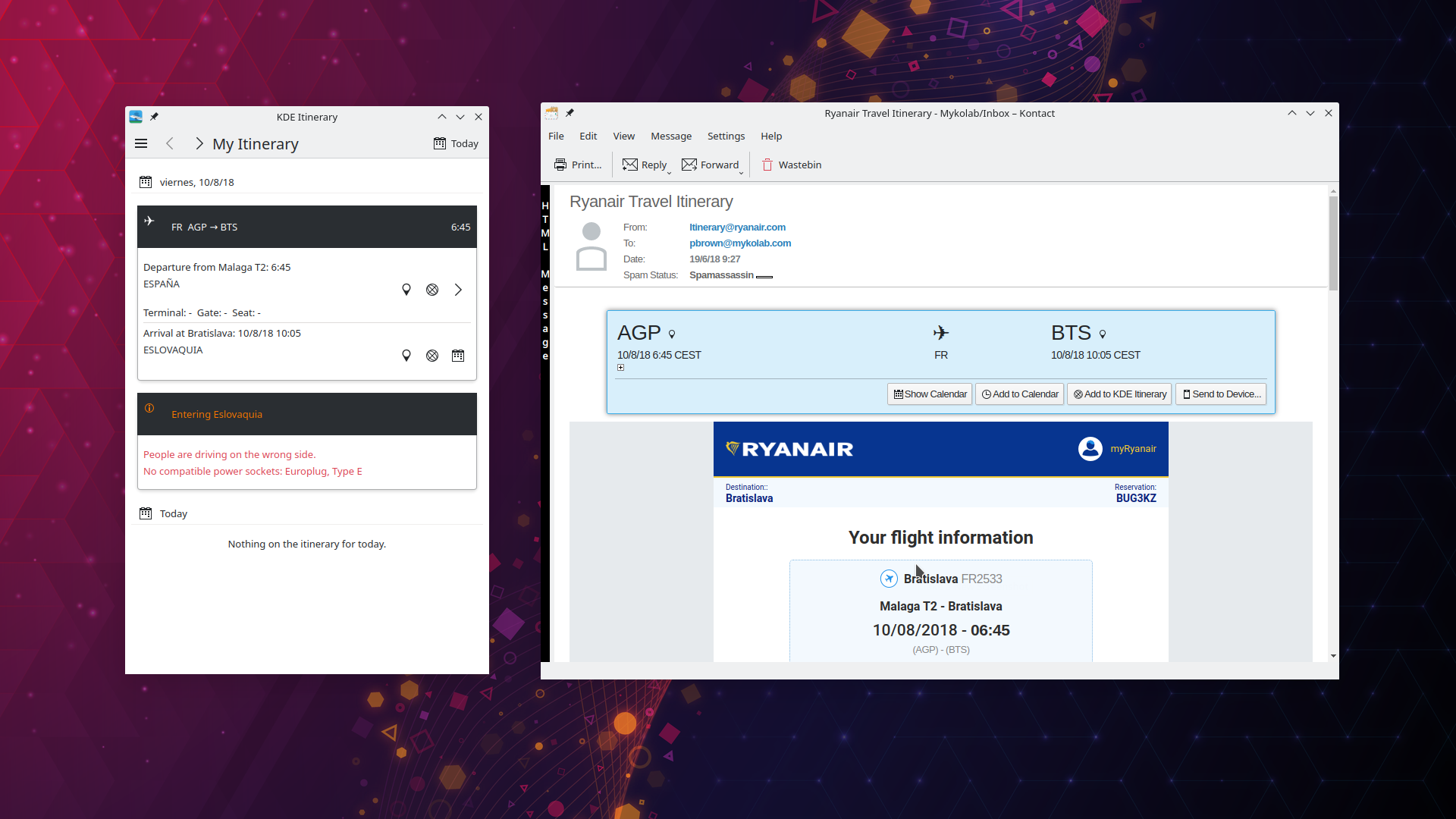 Itinerary 从 Kmail 提取信息
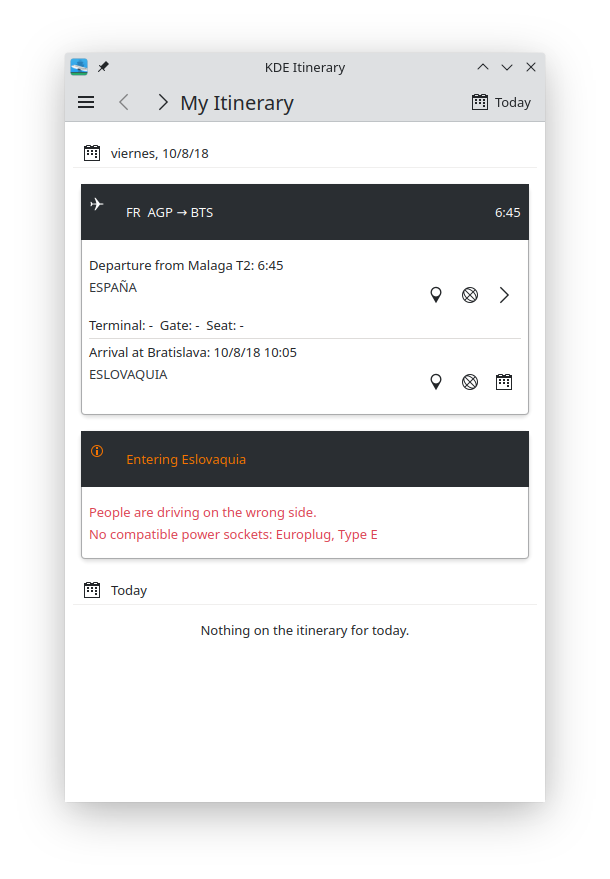 Itinerary 所有旅行的概览
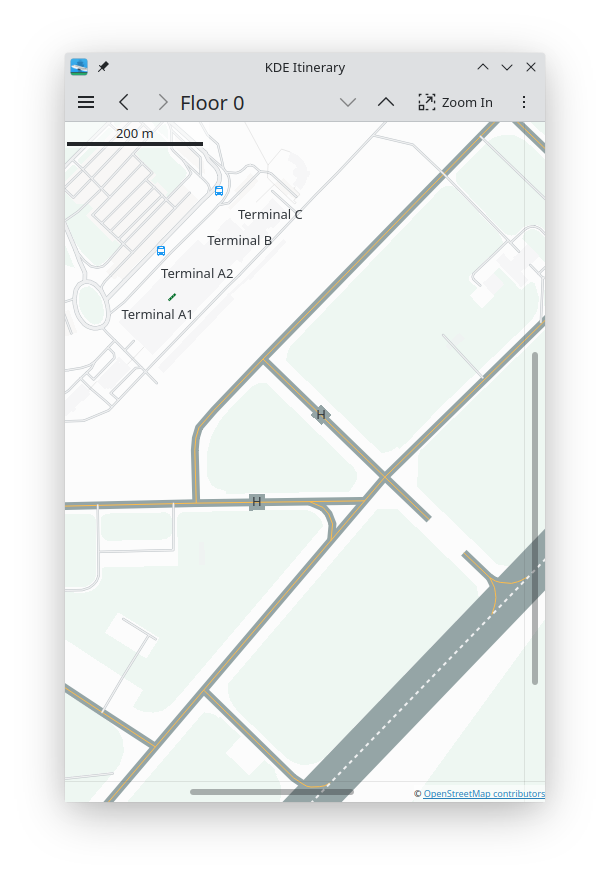 Itinerary 机场终端地图
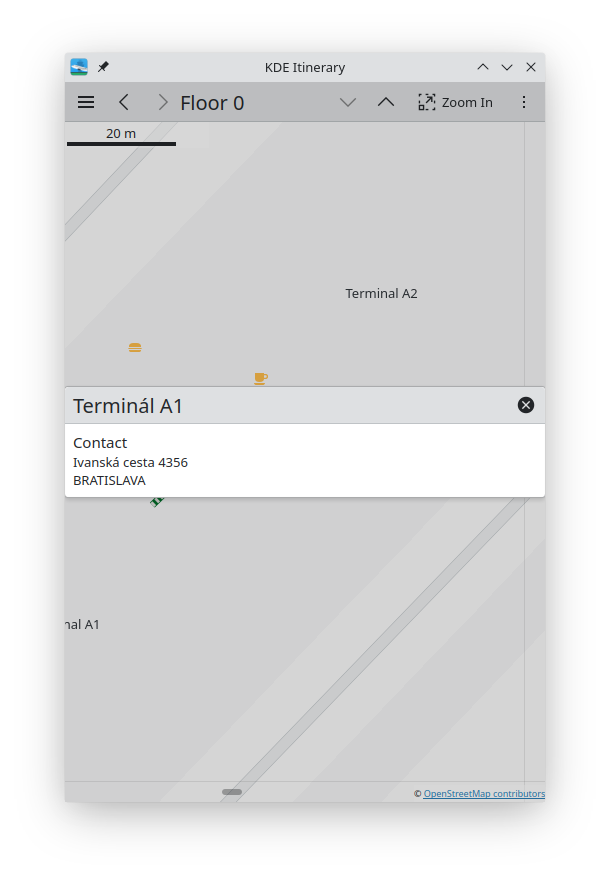 Itinerary:终端信息
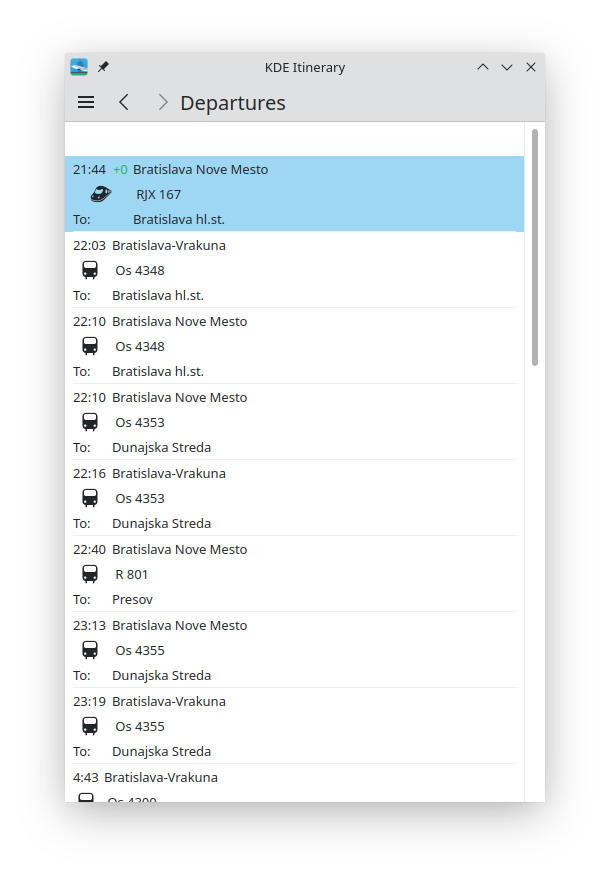 Itinerary:离开信息
Dolphin
Dolphin 是进入你的文件和文件夹的入口。使用 Dolphin,你可以探索、搜索、移动、复制和打开硬盘和笔式驱动器中的所有内容。你还可以访问远程机器,处理存储在远程机器上的文件,就好像它们是你本地文件系统的一部分。这包括存储在 Google Drive、Nextcloud 和 Dropbox 等云服务中的文件。
Dolphin_archive_decompressing.png)
您能了解 Dolphin 压缩归档:点击 zip 或 tar.gz 归档,您可以把它当成文件夹来导航,选择并选择要复制出来和解压的项目。在今天发布的版本中,Dolphin 现在允许您同时解压多个存档文件。选择您想要解包的所有压缩档,右键点击其中一个,然后从弹出菜单中选择_Extract_。
在可用性部分,Dolphin 在您分割视图区域或调整窗口大小时重新排列图标时有了更顺畅的动画。您也可以选择新打开的标签是在标签栏末尾,还是在当前标签页之后。如果您按住 Ctrl 键并点击在 常用位置 面板中的条目,它将在一个新标签中打开。
总是考虑到您的方便,新版本的 Dolphin 允许您在上下文菜单中修改条目,这样您就可以删除您从不使用的项目。如果您找不到选项,您总是可以使用 Dolphin 右上角的汉堡菜单:点击它,它将开启一个完整的选项和设置清单。
Dolphin_archive_hamburger.png)
开发者会很喜欢 Dolphin 与 Git 、Mercurial 和 Subversion 版本库强强联手。Dolphin 为您提供弹出菜单选项以添加和删除文件到您的提交、恢复更改、以及显示您的仓库日志。它还将您的文件的状态可视化,它们是否在等待、哪些已提交、哪些已推送。新版本包括为上述所有系统检测您的仓库的工作副本根。
Elisa
Elisa 正在很快成为 KDE 音乐爱好者中的新宠。它的直截了当、有吸引力的外观现在有着完整的移动界面,将它推向了 Android 和 Plasma Mobile 的一流身份。
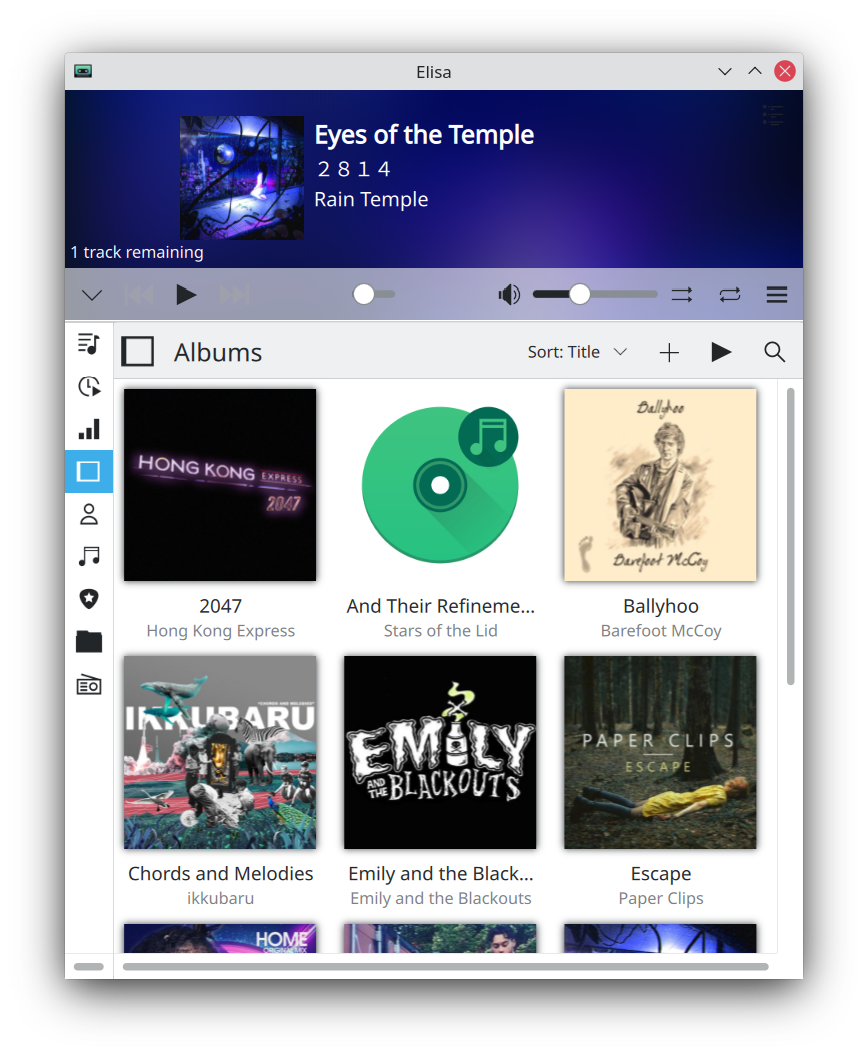 Elisa 移动布局
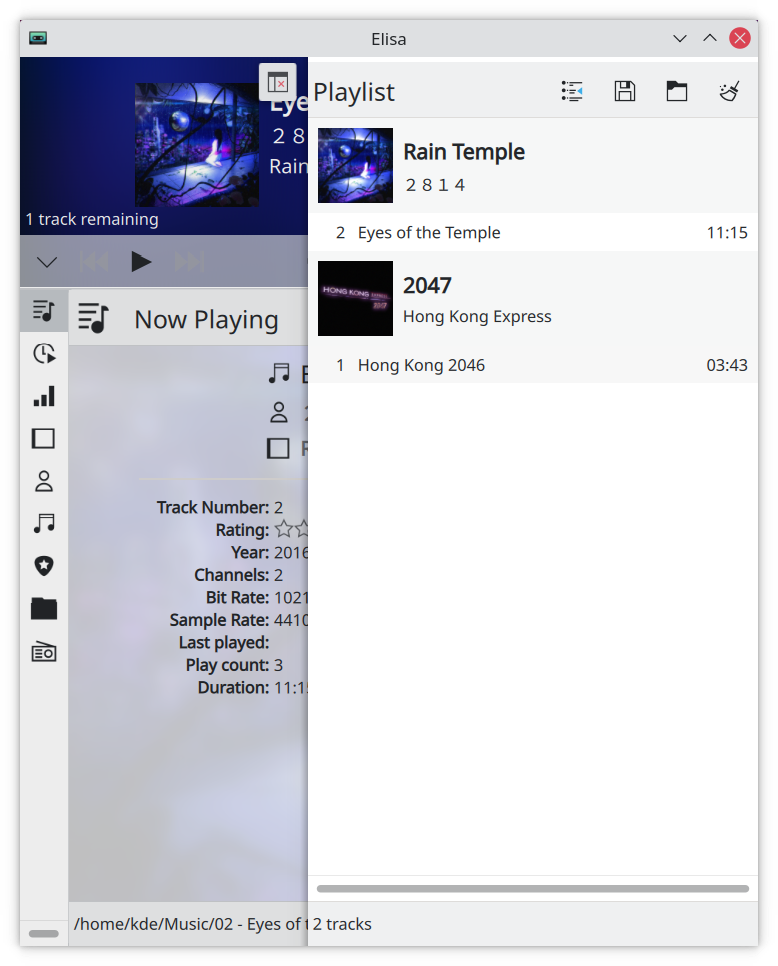 带有移动版布局的 Elisa 播放列表
除了它已经可以使用的所有格式外,在这个版本中,Elisa 还可以播放 AAC 文件并使用 .m3u8 格式播放列表文件。这意味着您可以使用非西方字母、音调标记、西里尔文、阿拉伯文、乌尔都文、印地文、中文或任何其他来写歌曲标题、艺术家和专辑。
But that doesn't mean Elisa has become clunkier. Quite the contrary: the new version released with KDE Gear today actually consumes less memory when you scroll around the app, making it snappy and a joy to use.
One of the best players for your desktop or phone.
Kdenlive
Download and install Kdenlive and you will be making professional-looking movies 🎥 in no time. Kdenlive is the most powerful Free Software video editor out there, and it just keeps on getting better. Need stock footage for your documentary? Check out the Online Resources panel and browse for video and audio clips and still images from Pixabay, Archive.org and Pexels. Want to reach a wider audience? Add subtitles! You will make it easier for people from other countries, and you will also help those with hearing problems. The in-built subtitle tool allows you to add captions directly from within Kdenlive or import them from another program. Not only that, but you can also configure Kdenlive with a nifty speech-to-text module which will identify speech on audio tracks and translate them to subtitles automatically for you.
Kdenlive_onlineresources.png)
Apart from new features, Kdenlive becomes easier to use with every new version. It was already easy to pan and zoom around the tracks using the mouse and different key combinations, but now... Did you notice that the horizontal scrollbar has handles on each end? When you click, hold and pull them, you can adjust the zoom on the tracks to what you are most comfortable with. According to the developers, zoombars, as they have been called, will soon be available on the vertical scrollbar too, and you will be able to use them to smoothly adjust the height of tracks.
Kdenlive_subtitles_onlineresources.png)
Finally, Kdenlive now supports the AV1 video coding format, a cutting edge format already being used by the likes of YouTube and Netflix.
Unleash your internal Nolan and get to grips with Kdenlive now!
Konsole
Graphical applications are great, but sometimes you just need a good, old-fashioned terminal to get things done. Well, congratulations, because Konsole is two of those things: it is a terminal, and it is good... But it is far from old-fashioned.
Konsole includes very sophisticated features, like panes that can be split vertically or horizontally. Drag them around with the cursor to place them, and even synchronize them, so instructions written in one pane, will show up and run in others at the same time. Besides, when you resize panes, now the text on display reflows, adapting to the new size.
The barriers between text interface and graphical applications blur and disappear with Konsole. Not only is Konsole built into other KDE applications like Kate or Dolphin for your convenience, but, hover your cursor over an image file, and a preview will pop up. Hover it over a folder and preview of its contents will appear. Right-clicking on a file's name will bring up a menu that, among other things, will let you chose the application you can use to open it. Holding down the Ctrl key and clicking on a file, will open it in a graphical application (for example, images will usually open in Gwenview and folders open in Dolphin). In the latest version, Konsole even lets you choose which editor to open when you Ctrl + click on a text file.
This is but a small sample of the things Konsole can do, making it truly a terminal emulator for the 21st century. Regardless of whether you are a veteran or a novice in command line matters, Konsole will give you all the features you need for your shell-based tasks.
... And All This Too:
- Kate, KDE's Advanced Text Editor, now comes with touchscreen scrolling support; it can display all the TODO items in a project; and lets you perform basic git operations from within the app, such as viewing diffs, staging, committing, and stashing. Also, check out Kate's swanky new website! Learn more about all the new features.
- Okular is KDE's document viewer. When you try to open a new document that is already open, Okular now switches to the already open document instead of displaying two copies; Okular's support for FictionBook files has new features; and you can now digitally sign your documents.
- Gwenview, KDE's image and video viewer, displays the current and remaining time when playing a video, and lets you adjust the quality/compression level for images in JPEG XL, WebP, AVIF, HEIF, and HEIC formats.
- Spectacle, KDE's screenshot utility, now lets you change the default screenshot file format when using a non-English language.
完整更新日志
如何获取 KDE 应用程序
虽然我们完全支持各个发行版分发我们的软件,但 KDE Gear 21.04 的应用程序也会在不久后推送到以下的 Linux 应用程序商店:
如果您想帮助我们将更多的 KDE 应用程序发表到应用程序商店、让 KDE 支持更多应用程序商店、使应用程序更好地整合到我们的开发流程中,请在 All About the Apps 聊天室 与我们联系。

提示:在此公告发布时,并非所有发行版都能立即提供最新版软件。 软件包下载百科页面
编译 KDE Gear
KDE Gear 21.04 的完整源代码可以自由下载。编译和安装指南可从 KDE Gear 21.04 信息页面 查看。
关于 KDE
KDE 是一支国际技术团队,致力于为桌面和便携式计算需求开发自由开源软件。KDE 的产品包括适用于 Linux 和 UNIX 平台的现代桌面系统、功能齐全的办公生产力套件和团队协作软件、以及涵盖了网络、多媒体、娱乐、教育、图像处理和软件开发等众多领域的数百款应用软件。KDE 软件已被翻译成 60 多种语言,并在设计时充分考虑了易用性和现代无障碍原则。KDE 的全功能应用程序能够在 Linux、BSD、Windows、Haiku 和 macOS 系统中以原生状态运行。
商标声明。
KDE® 和 K 桌面环境® 徽标是KDE e.V. 的注册商标。
Linux 是 Linus Torvalds 的注册商标。 UNIX 是 The Open Group 在美国和其他国家的注册商标。
本公告中提到的所有其他商标和版权物均为其所有者的财产。
媒体联系方式
欲了解更多信息,请向我们发送电子邮件: press@kde.org
文章作者:Paul Brown、Carl Schwan 和 Áron Kovács,使用 CC-BY-4.0 许可证发布。