Plasma 6.7 brings powerful new features to KDE’s classic desktop, and refines its user experience to new levels.
Enjoy thoughtfully-designed improvements that solve real problems, a sneak peek of future theming bliss, better performance, and more.
Read on to learn all about it!
Höjdpunkter
Per-screen virtual desktops
After 21 years, hopefully it will have been worth the wait… per-screen virtual desktops have finally arrived!
Test your microphone volume
No more being told your audio is too loud or quiet, or wondering if it’s your microphone or an app that’s misbehaving.
Press-and-hold for special characters
With Plasma’s virtual keyboard enabled, press and hold a key to type special characters related to it.
Grafiska komponenter
Light/dark mode toggle
In Plasma 6.6, we introduced the ability to create your own Global Themes, and switch between them as part of the day-night cycle. Plasma 6.7 puts you even more in control with a quick toggle to switch between light and dark Global Themes immediately.
Vietnamese lunar calendar
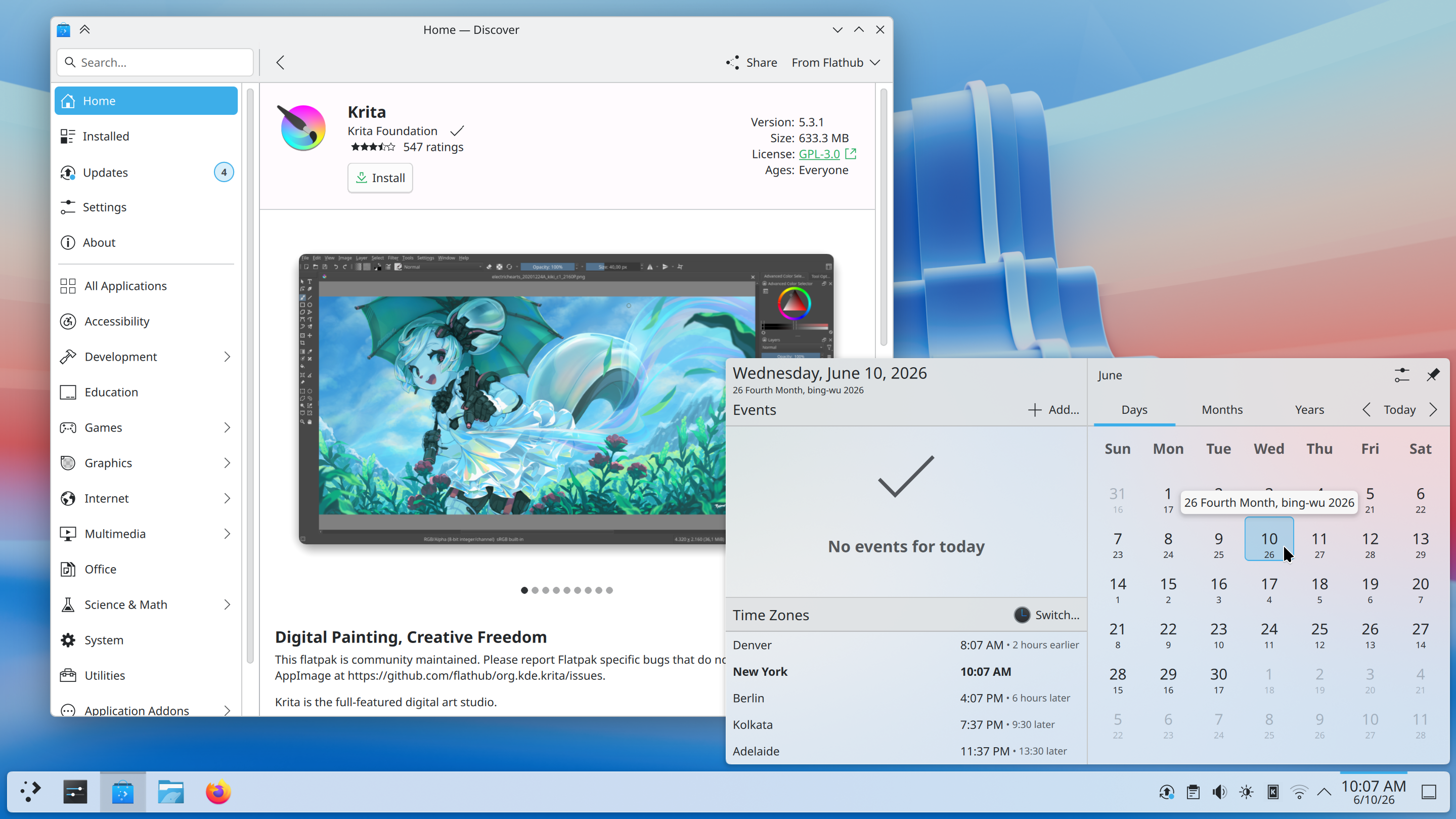
Plasma 6.7 adds the Vietnamese lunar calendar to its available set of non-Gregorian calendars. Now you can keep up with dates and events using both calendar systems with more ease than ever!
“Background Apps” in the System Tray
The System Tray is already the place for monitoring apps running in the background using traditional methods. Plasma 6.7 extends this support by also showing apps using the newer “Background Apps” system, which is more common for apps using the Flatpak package format.
Printing
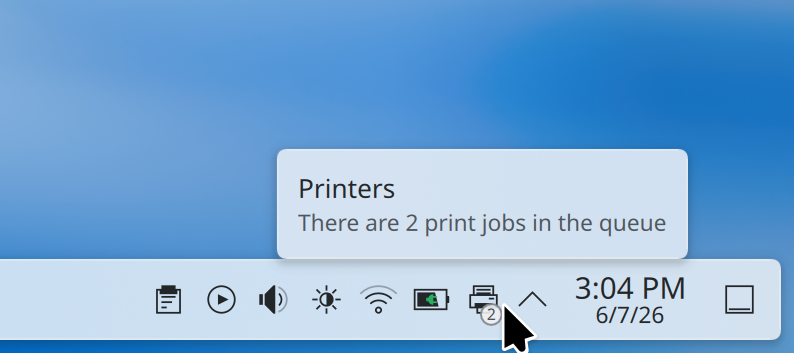
Plasma’s printing support continues to mature. Now the System Tray icon for printers shows the number of active jobs in a little badge.
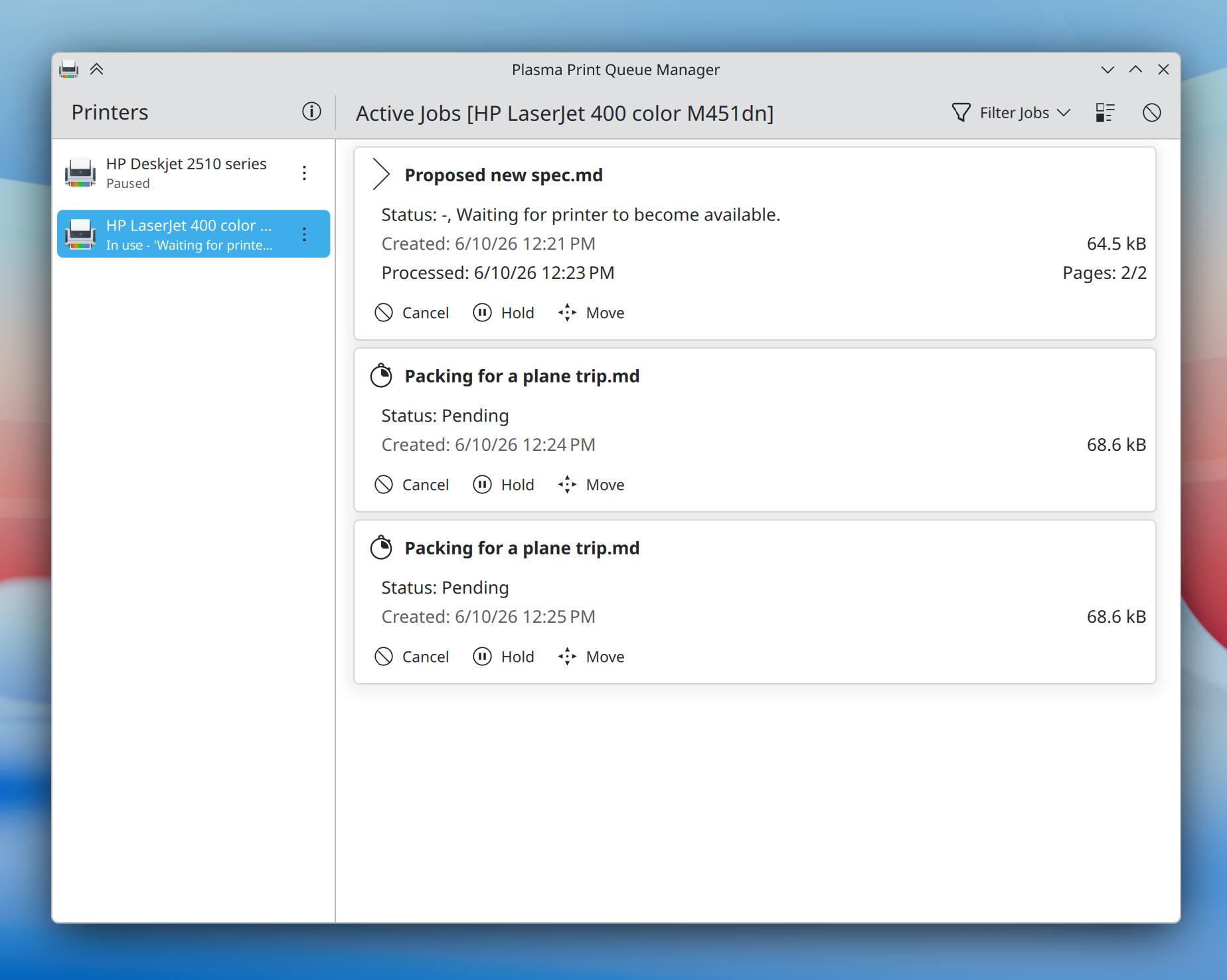
On the enterprise side, Plasma 6.7 makes it substantially easier to connect to shared printers on Windows networks, and a new print queue management tool offers more power than ever before to those administering multiple frequently-used printers — while remaining simple and comprehensible enough for home use, too.
Användbarhet
Plasma 6.7 puts a particular focus on refining the desktop experience to make common tasks faster than ever. Here’s just a small assortment:
Faster virtual desktop switching in the Overview
When you press Meta + W to open the Overview screen, Plasma 6.7 lets you switch virtual desktops simply by scrolling or pressing the Page Up or Page Down keys.
Drag and drop to add and remove favorites
It’s now easier than ever to add or remove favorite apps in the Application Launcher, Application Menu, and Application Dashboard widgets: just drag and drop!
More intuitive software management
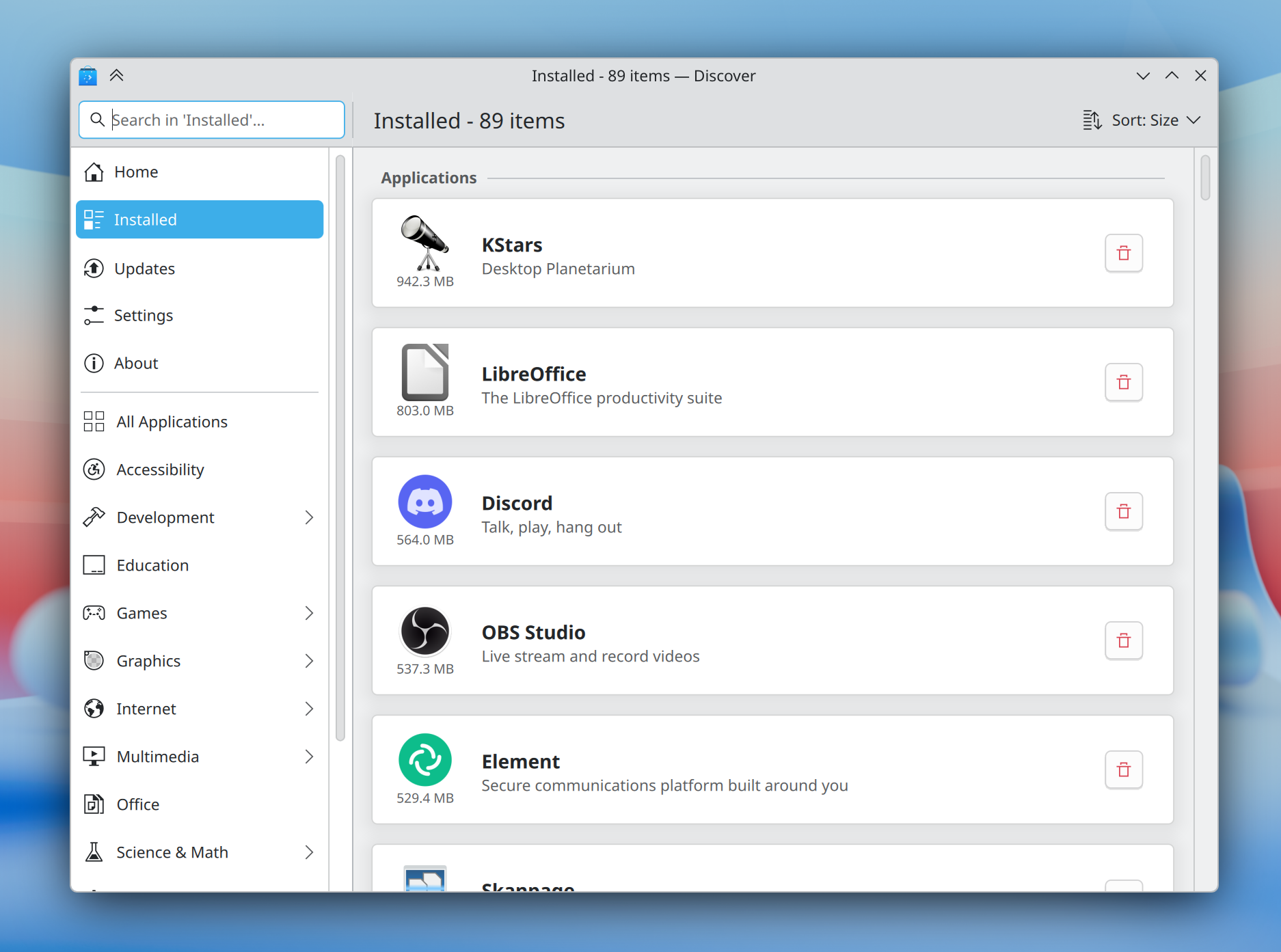
The Discover software center now features a more obvious “Install” button and redesigned app cards with more information, plus a more intuitive sorting order.
In addition, installed software is now grouped by type, making it easier than ever to find what you’re looking for.
Easier to compare different time zones
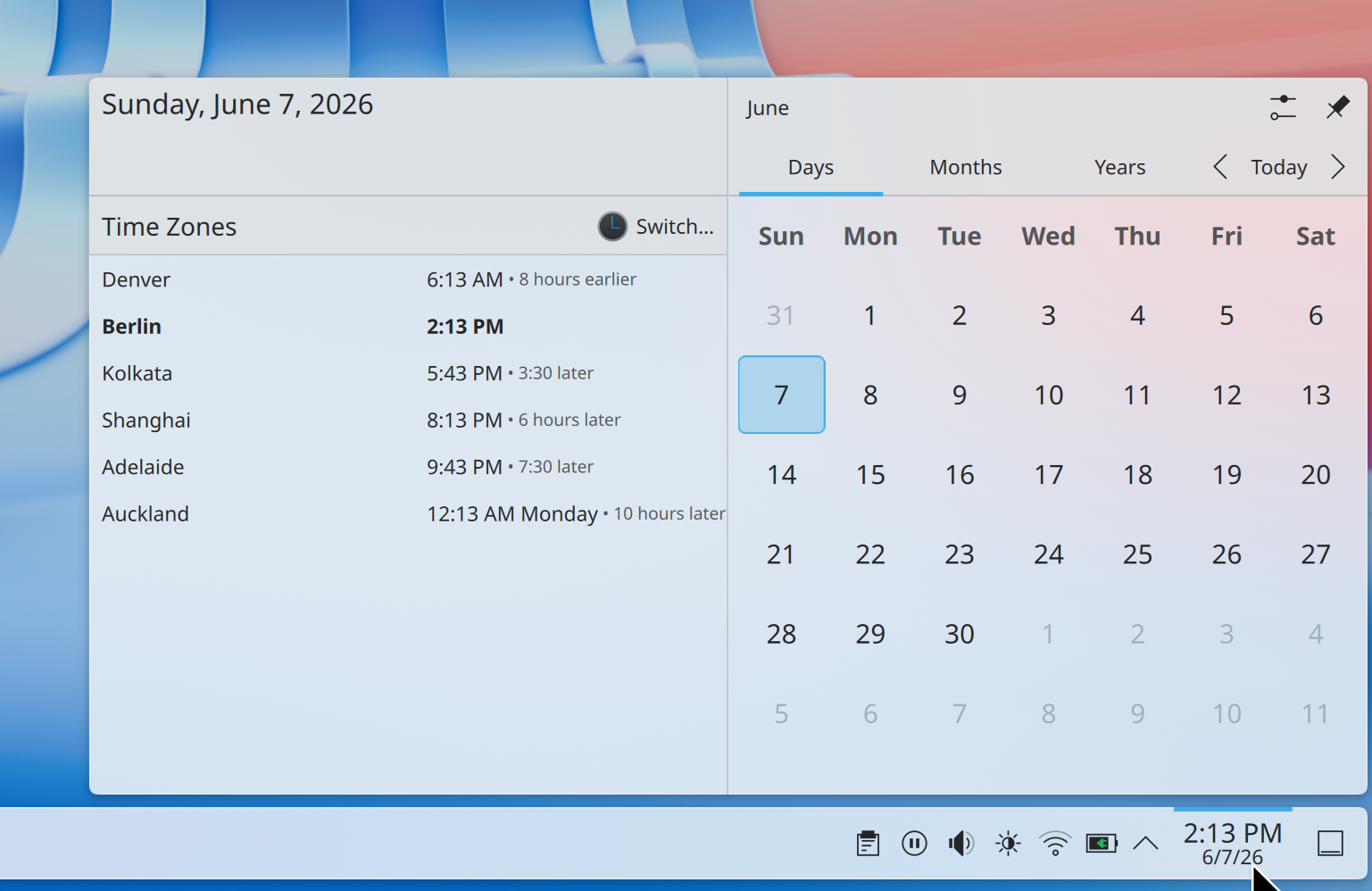
How much earlier is it in Denver if you’re in Berlin? No longer will a question like this require mental gymnastics; Plasma 6.7 makes it easy to see how many hours earlier or later it is in each time zone shown in the Digital Clock widget compared to your local time zone.
“Type-ahead” on the desktop
For power users, the desktop layout now supports switching to “type-ahead” mode for quickly selecting files when typing on the desktop. You can change this back to activating KRunner if you prefer by Right-clicking on desktop and selecting Desktop and Wallpaper → Icons → Typing on the desktop from the pop-up menu.
Theming and styling: Something old, something new
Oxygen
In preparation for KDE’s 30th anniversary later this year, we’ve brought the Oxygen theme — used by default in KDE 4 — back up to par with the current Breeze theme.
Air, the Plasma Style providing a light version of Oxygen, has also returned, and we’ve reworked our Global Themes to feature light, dark, and twilight versions. Both Air and Oxygen benefit from a multitude of fixes, improvements, and restorations, including support for adaptive opacity, different panel positions, and more.
The classic KDE 4 Air and Horos wallpapers also make a return.
Breeze
The default Breeze theme also continues to evolve, now featuring rounded list and grid view highlights for many applications, and visible click effects for menu items.
Plasma’s Notifications have been given a fancier animation: they now slide in from the nearest screen edge. This makes them more visually prominent and less likely to be missed, while at the same time avoiding being too attention-grabbing.
Union
Though Plasma’s theming capabilities are second to none, for years creating those themes has been a difficult and fragmented experience.
Plasma’s all-new Union theming system intends to streamline theming by making it possible to style Plasma, QtQuick apps, and QtWidgets apps all with a single set of easy-to-write CSS — the world’s most popular and documented open standard for this purpose.
Plasma 6.7 marks the inaugural release of Union, here with a tech preview of the QtQuick style.
Union is under heavy development, and hence off by default. To test it out, make sure the union package is installed (name may differ depending on your OS), and select “Union” in System Settings → Colors & Themes → Application Style.
Applications must be restarted in order to use Union, and are expected to look nearly identical to Breeze.
You can find out more about the current state and future plans for Union on its developer’s blog.
Colors, graphics, and performance
Plasma has always offered a superb graphical experience, and 6.7 piles on further improvements.
No longer do you have to choose between color management using an ICC profile or enjoying HDR content; now both are possible at the same time!
In addition, you can now control whether the colors on the screen turn redder at extremely low brightness levels on many AMD laptops.
Finally, the team put a great deal of work into optimization, resulting in better performance and lower power usage for CPU-rendered apps, many full-screen windows, and integrated Intel GPUs.
But that’s not all…
Plasma 6.7 has even more to offer, including:
The ability to duplicate network connections, so you can quickly create several with only small differences between them — which can be useful in an enterprise or school setting
An option to sync mouse and stylus pointers
An option to set and change the preferred calendar app
An option to assign keyboard shortcuts for toggling the global “push-to-talk” microphone mute mode and clearing the notification history, making these actions faster to trigger
An easy way of selecting mixed skin tone emojis in Emoji Selector app
A System Monitor app that respects your preference regarding storage units (e.g. “GiB” vs “GB”)
A Global Menu widget that shows menus for apps on other screens by default
A “Recent Locations” item in the Application Menu widget
Customizable sorting and grouping in the Window List widget
Support for many more Wayland protocols and portals
Plasma 6.7 is dedicated to Eric Laffoon, who passed away in May.
Eric was a longtime supporter of KDE going back decades, offering up his time, money, bug reports, and advocacy.
Eric is sorely missed, and we dedicate this release to him.
Färdiga implementeringar
Det enklaste sättet att prova den är med en färdig implementering som startas från en USB-disk. Docker-avbildningar erbjuder också ett snabbt och enkelt sätt att prova Plasma.
KDE är en gemenskap av fri programvara som bara finns och växer på grund av hjälp från många frivilliga som skänker sin tid och kraft. KDE söker alltid efter nya frivilliga och bidragsgivare, vare sig det gäller hjälp med att koda, rapportera eller rätta fel, skriva dokumentation, översätta, marknadsföra, bidra finansiellt, etc. Alla bidrag uppskattas tacksamt och accepteras ytterst gärna. Läs gärna igenom sidan Stöd KDE för ytterligare information, eller bli stödmedlem i KDE e.V. via vårt initiativ Join the Game.
Om KDE
KDE är en internationell teknikgrupp som skapar fri programvara med öppen källkod för stationära och bärbara datorer. Bland KDE:s produkter finns ett modernt skrivbordssystem för Linux- och UNIX-plattformar, omfattande programsviter för kontorsproduktivitet och grupprogram, och hundratals programvaror i många kategorier inklusive Internet- och webbprogram, multimedia, underhållning, utbildning, grafik och programvaruutveckling. KDE:s programvara är översatt till mer än 60 språk och byggs med användarvänlighet och moderna tillgänglighetsprinciper i åtanke. KDE:s funktionsrika program kör direkt på Linux, BSD, Windows, Haiku och macOS.
Varumärkesdeklarationer
KDE® och logotypen för K-skrivbordsmiljön® är varumärken registrerade av KDE e.V.. Linux är ett registrerat varumärke av Linus Torvalds. UNIX är ett registrerat varumärke av The Open Group i Förenta staterna och andra länder. Alla övriga varumärken och upphovsrätter nämnda i det här tillkännagivandet hör till sina respektive ägare.
Presskontakter
Skicka e-post till oss för mer information: press@kde.org