Бета-версия Plasma 5.9 стильно открывает 2017 год.
Бета-версия KDE Plasma 5.9
Четверг, 12 января 2017
Сегодня KDE выпускает бета-версию первого в этом году обновления возможностей Plasma — Plasma 5.9. Хотя этот выпуск приносит множество новых интересных возможностей на ваш рабочий стол, продолжится выпуск исправлений ошибок для Plasma 5.8 LTS.
Be even more productive
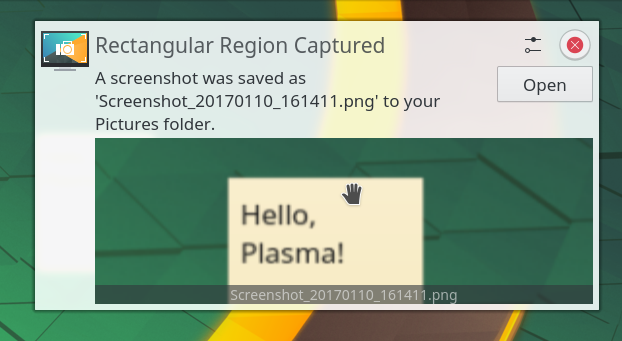
Spectacle screenshot notifications can now be dragged into e-mail composers (including web mail)
In our ongoing effort to make you more productive with Plasma we added interactive previews to our notifications. This is most noticeable when you take a screenshot using Spectacle's global keyboard shortcuts (Shift+Print Scr): you can drag the resulting file from the notification popup directly into a chat window, an email composer or a web browser form, without ever having to leave the application you're currently working with. Drag and drop was improved throughout the desktop, with new drag and drop functionality to add widgets directly to the system tray. Widgets can also be added directly from the full screen Application Dashboard launcher.
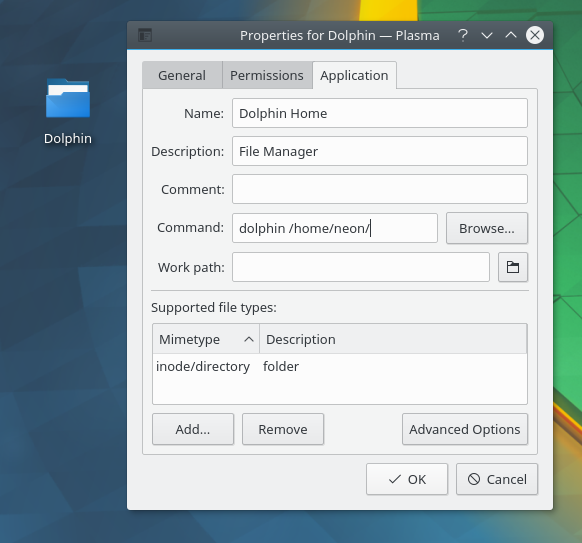
Icon Widget Properties
The icon widget that is created for you when you drag an application or document onto your desktop or a panel sees the return of a settings dialog: you can now change the icon, label text, working directory, and other properties. Its context menu now also sports an 'Open with' section as well as a link to open the folder the file it points to is located in.
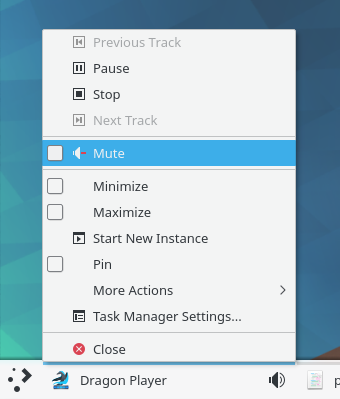
Отключение звука с помощью диспетчера задач на панели
По многочисленным просьбам реализовано переключение между окнами в Диспетчере задач с помощью сочетаний клавиш Meta+цифра для интенсивной многозадачности. Также в Диспетчере задач появилась возможность закреплять разные приложения в каждой из ваших комнат. При желании сосредоточиться на одной конкретной задаче, приложения, воспроизводящие звук, помечаются в Диспетчере задач подобно тому, как это сделано в современных веб-браузерах. Вместе с кнопкой отключения звука для мешающего приложения это помогает сохранять концентрацию.
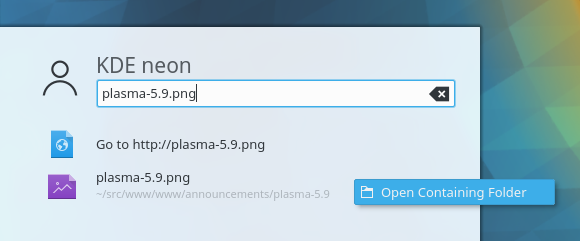
Поиск действий
The Quick Launch applet now supports jump list actions, bringing it to feature parity with the other launchers in Plasma. KRunner actions, such as “Run in Terminal” and “Open containing folder” are now also shown for the KRunner-powered search results in the application launchers.
A new applet was added restoring an earlier KDE 4 feature of being able to group multiple widgets together in a single widget operated by a tabbed interface. This allows you to quickly access multiple arrangements and setups at your fingertips.
More streamlined visuals
Improvements have been made to the look and feel of the Plasma Desktop and its applications. Scroll bars in the Breeze style, for instance, have transitioned to a more compact and beautiful design, giving our applications a sleek and modern look.
Глобальные меню
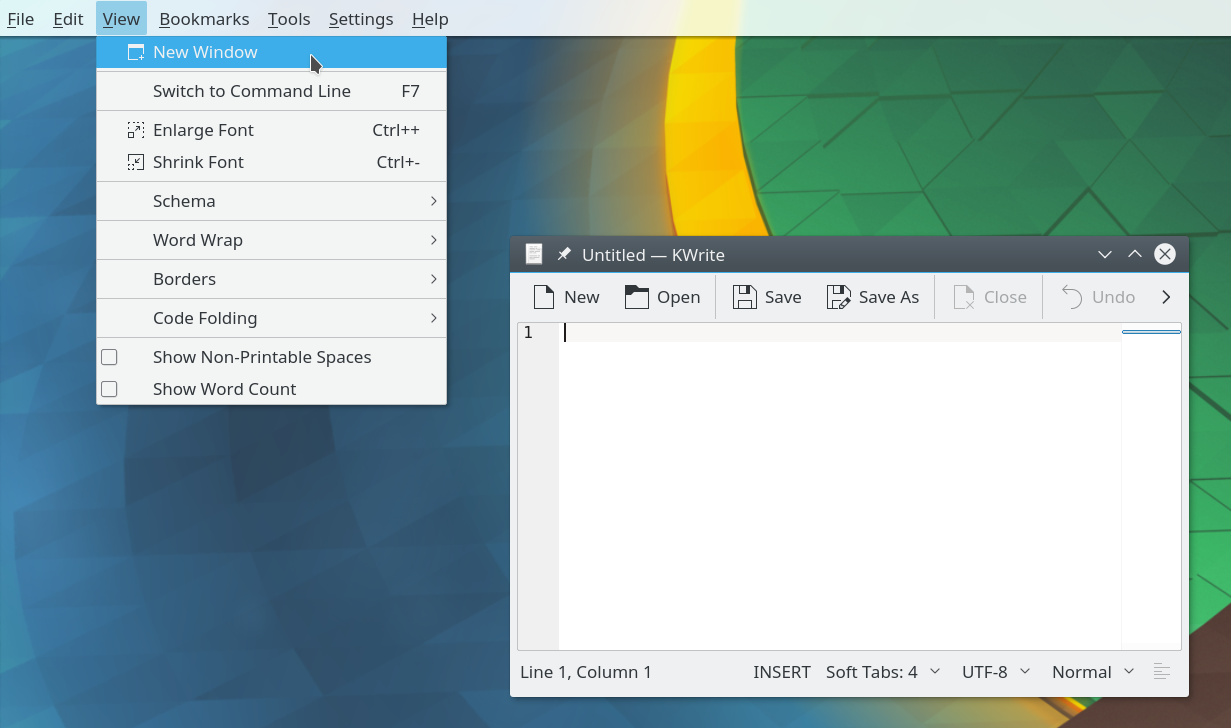
Global Menus in a Plasma Widget
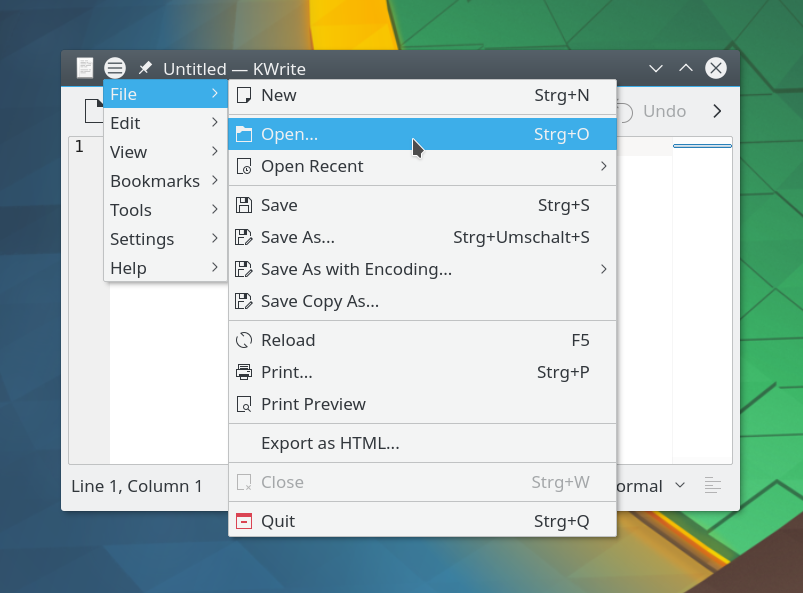
Глобальные меню в строке заголовка окна
Global Menus have returned. KDE's pioneering feature to separate the menu bar from the application window allows for new user interface paradigm with either a Plasma Widget showing the menu or neatly tucked away in the window bar.
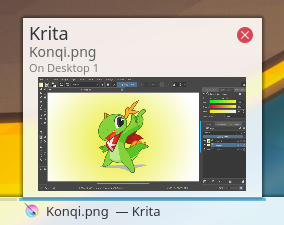
Аккуратные подсказки диспетчера задач
Task Manager tooltips have been redesigned to provide more information while being significantly more compact. Folder View is now able to display file emblems which are used, for example, to indicate symlinks. Overall user experience when navigating and renaming files has been greatly improved.
Расширенные возможности импорта и экспорта оформлений Plasma
The global Look and Feel desktop themes now support changing the window decoration as well – the 'lookandfeelexplorer' theme creation utility will export your current window decoration to the theme you create.
If you install, from the KDE store, themes that depend on other artwork packs also present on the KDE store (such as Plasma themes and Icon themes) they will be automatically downloaded, in order to give you the full experience intended by the theme creator.
New network configuration module
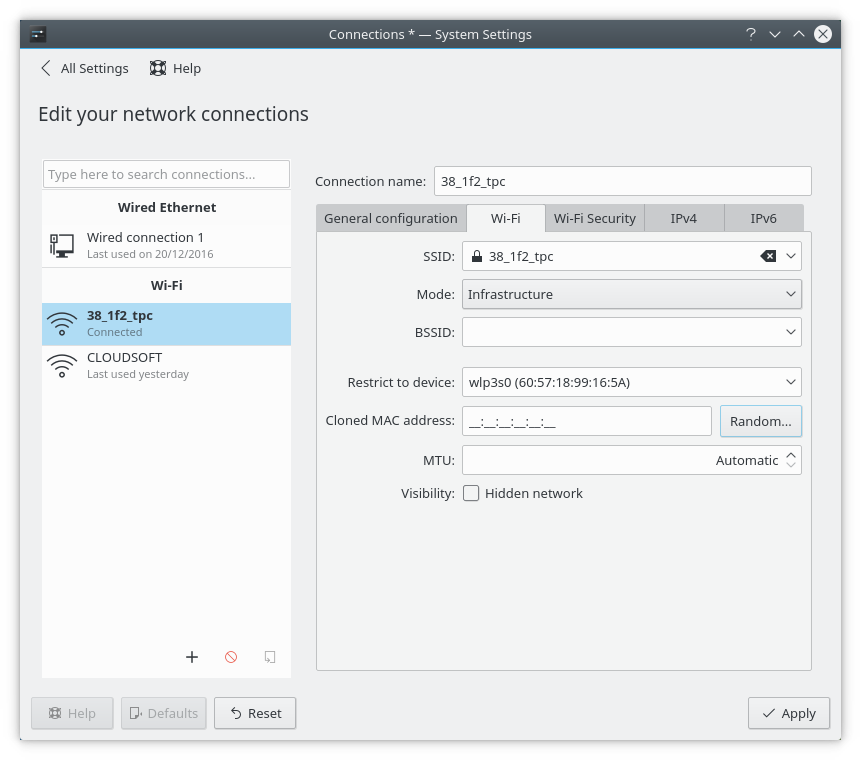
Настройка сетевых соединений
A new configuration module for network connections has been added to System Settings, using QML and bringing a new fresh look. Design of the module is inspired by our network applet, while the configuration functionality itself is based on the previous Connection Editor. This means that although it features a new design, functionality remains using the proven codebase.
Wayland
Wayland has been an ongoing transitional task, getting closer to feature completion with every release. This release makes it even more accessible for enthusiastic followers to try Wayland and start reporting any bugs they might find. Notable improvements in this release include:
An ability to take screenshots or use a color picker. Fullscreen users will be pleased at borderless maximized windows. Pointers can now be confined by applications, gestures are supported (see video right) and relative motions used by games were added. Input devices were made more configurable and now save between sessions. There is also a new settings tool for touchpads.
Using the Breeze style you can now drag applications by clicking on an empty area of the UI just like in X. When running X applications the window icon will show up properly on the panel. Panels can now auto-hide. Custom color schemes can be set for windows, useful for accessibility.
Открыть полный список измененийЗагрузочные образы
Самый простой способ опробовать Plasma — это загрузиться с компакт-диска или USB-флеш-накопителя. Другой быстрый способ — запустить Plasma в Docker из готовых образов.
Загрузить образы дисков с Plasma Загрузить образы Docker с PlasmaПакеты
В дистрибутивах ОС Linux либо уже появились, либо скоро появятся пакеты, перечисленные на вики-странице.
Обратите внимание, пакеты данного выпуска могут быть недоступны на момент данного объявления во всех дистрибутивах.
Вики-страница об установке пакетовИсходный код
Возможно собрать и установить Plasma непосредственно из исходного кода.
Обновляемые сообществом инструкции по сборке Исходный кодОбратная связь
Оставить отзыв и подписаться на новости можно в социальных сетях:
Обсуждайте KDE в форумах KDE.
Вы можете оставить отзыв непосредственно разработчикам через канал #Plasma в Matrix, список рассылки Plasma-devel или сообщить о проблемах через Bugzilla. Если вам нравится то, чем занимается наша команда, сообщите им об этом!
Ваши отзывы очень ценны.
Поддержите KDE
KDE — это сообщество разработки свободного программного обеспечения, которое существует и растёт только благодаря многим добровольцам, которые жертвуют своим временем и усилиями. KDE всегда ищет новых участников, способных помочь в разработке, исправлении ошибок или их нахождении, написании документации и переводов, продвижении, деньгах и другими способами. Любая поддержка приветствуется и будет принята с благодарностью. Ознакомьтесь со страницей поддержки KDE, чтобы узнать больше или стать поддерживающим участником KDE e.V. через нашу инициативу Вступайте в игру.
О KDE
KDE — это международная IT-команда, которая создаёт открытое и свободное программное обеспечение для настольных компьютеров и мобильных устройств. В число продуктов KDE входят современные рабочие окружения для платформ Linux и UNIX, полнофункциональный офисный пакет и средства групповой работы, а также сотни приложений разных категорий, таких как веб, мультимедиа, развлечения, образование, графика и разработка ПО. Программные продукты KDE переведены на более чем 60 языков, а при создании их большое внимание уделяется простоте использования, современности и доступности. Многофункциональные приложения KDE полноценно работают в Linux, BSD, Windows, Haiku и macOS.
Сведения о товарных знаках.
KDE® и логотип K Desktop Environment® являются зарегистрированными торговыми марками KDE e.V.
Linux — зарегистрированный товарный знак Линуса Торвальдса. UNIX — зарегистрированный товарный знак The Open Group в США и других странах.
Все другие товарные знаки и объекты авторских прав, упомянутые в этом объявлении, принадлежат их законным владельцам.
Контакты для прессы
Для получения дополнительной информации свяжитесь с нами по электронной почте: press@kde.org