Юбилейный выпуск Plasma к 25-летию (бета)
Четверг, 16 сентября 2021
Представлена бета-версия Plasma — юбилейного издания к 25-летию проекта. Чтобы обеспечить пользователям наилучший опыт работы со следующей версией Plasma, KDE выпускает сегодня тестовую версию программного обеспечения. Более опытным пользователям рекомендуется протестировать её и сообщать о проблемах, чтобы разработчики смогли устранить недочёты до финального релиза, запланированного на 12 октября.
Выпуск Plasma в честь 25-летия — значительный шаг вперёд в создании более производительного и удобного рабочего стола. Повышены скорость и стабильность Plasma, а также реализованы улучшения, упрощающие использование как на настольных компьютерах, так и на устройствах с сенсорным вводом.
ВНИМАНИЕ: Это бета-программное обеспечение, выпущенное в целях тестирования. Не используйте бета-версию Plasma 25th Anniversary Edition в производственной среде или в качестве повседневной рабочей среды. Если вы всё же установите бета-версию Plasma 25th Anniversary Edition, будьте готовы к возможным ошибкам, которые могут нарушить обычную работу с компьютером, и сообщайте о них разработчикам.
Наиболее значимые изменения в бета-версии Plasma 25th Anniversary Edition:
Оформление Breeze
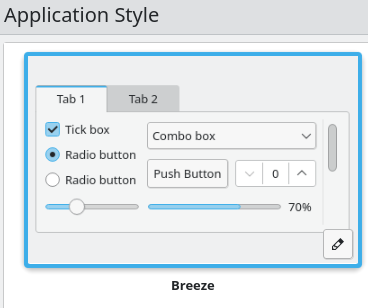
We made several improvements to the Breeze theme to make Plasma even more pleasant to use:
- Breeze now has redesigned buttons, menu items, checkboxes, radio buttons, sliders, scrollbar and spinboxes
- Полосы прокрутки и счётчики увеличены для удобства использования с сенсорным экраном.
- We added a gear loading spinner throughout Plasma and KDE apps
- There is a highlight effect for when opened widgets touch the panel edge
- Widgets on the desktop now have a blurred background
Меню запуска приложений
kickoff.png)
- The code received a gigantic overhaul
- A huge number of bugs were fixed
- It has improved performance and accessibility
- You can now choose whether to use a list or a grid for all apps view
- Теперь меню «Kickoff» можно закрепить на экране с помощью новой кнопки.
- Pressing-and-holding with a finger now opens the context menu
- You can now configure power/session action buttons
Прочие виджеты

- Entering tablet mode makes System Tray icons bigger, making it easier to use Plasma on touch screens
- You are now able to easily copy text on notifications with the Ctrl+C keyboard shortcut
- The Global Menu applet got a more "menu-like" appearance
- We added an easy way to switch power profiles. You can choose between "power-saver", "balanced" and "performance"
- It is now possible to fine-tune the manual speed setting for wired Ethernet connections and to disable IPv6
- Plasma теперь выводит дополнительные сведения о текущем подключённой сети.
- System Monitor and sensor widgets can now display load averages
- By default, the clipboard now remembers 20 items and ignores selections that you did not explicitly copy
- The Audio Volume applet now distinguishes between applications that are currently playing or recording audio
- It is now possible to delete selected items in the Clipboard applet’s popup by pressing the Delete key on the keyboard
Параметры системы
systemsettings.svg)
System Settings also received many new additions and improvements:
- Now you can override a color scheme's accent color in the Colors page
- The Feedback page now shows you a history of data that you chose to send to KDE
- You can set the status of your Bluetooth adapter on login. The options available are "on", "off" and "remember"
- Страница входа: функция синхронизации теперь синхронизирует расположение экранов.
- Display settings now shows a timer to revert possibly undesired changes
- We sorted the screen refresh rates list
- Night Color page now tells you when you’re about to undertake an action that will perform geolocation using a 3rd-party service
- Now it is easier to find options in System Settings. We added many keywords to improve search.

Центр программ Discover
plasmadiscover.svg)
- Discover will now load faster
- The app install button now tells you the name of the source

Wayland
In this release we made many improvements to the Wayland session:
- Добавлена новая анимация поворота экрана.
- The System Tray will notify you when something is recording the screen and will also let you cancel it
- Using touchpad gestures will be more satisfying than ever. Now the animation of realtime gestures follows your fingers
- It is now possible to middle-click-paste between native Wayland and XWayland apps
- You can now drag-and-drop stuff between native Wayland and XWayland apps
- In the Plasma Wayland session, it is now possible to adjust the Intel GPU driver’s Broadcast RGB settings
- It is now possible to change the screen resolution when run in a virtual machine
- Virtual desktops are now remembered on a per-activity basis
- The Task Manager now shows feedback on app icons when you click on them to launch apps
- The cursor now shows animated icon feedback when launching apps
Другое

- The "Present Windows" effect was rewritten
- Multi-screen layouts are now retained across X11 and Wayland sessions
- Numerous crash/hangs have been fixed
- DrKonqi, our bug reporting application, warns you when an app is unmaintained
- The question mark button in the titlebar is hidden by default for dialogs and System Settings
- Windows no longer become transparent when moving or resizing them
- Passwordless accounts without autologin now show a simple login button
- The Media Player widget now always displays the album art and its blurred background at the same time
- The Networks applet now supports additional authentication settings/protocols/requirements for OpenVPN connections
Полный список изменений доступен на соответствующей странице со списком изменений в Plasma 5.23 Beta.
О KDE
KDE — это международная IT-команда, которая создаёт открытое и свободное программное обеспечение для настольных компьютеров и мобильных устройств. В число продуктов KDE входят современные рабочие окружения для платформ Linux и UNIX, полнофункциональный офисный пакет и средства групповой работы, а также сотни приложений разных категорий, таких как веб, мультимедиа, развлечения, образование, графика и разработка ПО. Программные продукты KDE переведены на более чем 60 языков, а при создании их большое внимание уделяется простоте использования, современности и доступности. Многофункциональные приложения KDE полноценно работают в Linux, BSD, Windows, Haiku и macOS.
Сведения о товарных знаках.
KDE® и логотип K Desktop Environment® являются зарегистрированными торговыми марками KDE e.V.
Linux — зарегистрированный товарный знак Линуса Торвальдса. UNIX — зарегистрированный товарный знак The Open Group в США и других странах.
Все другие товарные знаки и объекты авторских прав, упомянутые в этом объявлении, принадлежат их законным владельцам.
Контакты для прессы
Для получения дополнительной информации свяжитесь с нами по электронной почте: press@kde.org
Статья предоставлена Nate Graham, Paul Brown, 2021 Aniqa Khokhar <aniqa.khokhar@kde.org, Björn Feberи Guilherme Marçal Silva и распространяется под лицензией CC-BY-4.0.