Obrazy na żywo
Najłatwiejszym sposobem na jego wypróbowanie, jest obraz na żywo uruchomiony z dysku USB. Obrazy Dokera także dają szybki i łatwy sposób na wypróbowanie Plazmy.
Download live images with Plasma Download Docker images with PlasmaWtorek, 16 Czerwiec 2026
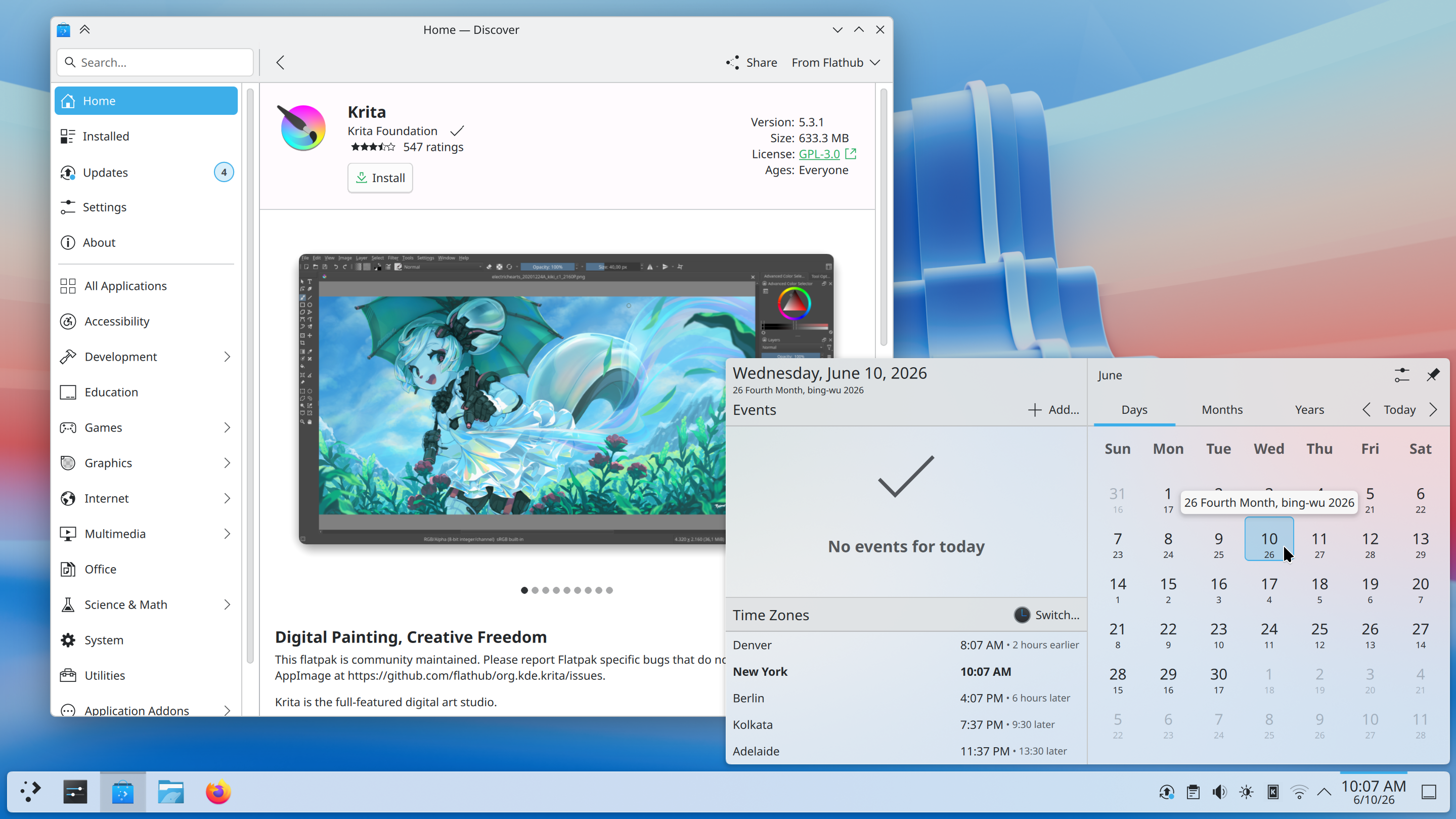
Plasma 6.7 brings powerful new features to KDE’s classic desktop, and refines its user experience to new levels.
Enjoy thoughtfully-designed improvements that solve real problems, a sneak peek of future theming bliss, better performance, and more.
Read on to learn all about it!
After 21 years, hopefully it will have been worth the wait… per-screen virtual desktops have finally arrived!
No more being told your audio is too loud or quiet, or wondering if it’s your microphone or an app that’s misbehaving.
With Plasma’s virtual keyboard enabled, press and hold a key to type special characters related to it.
In Plasma 6.6, we introduced the ability to create your own Global Themes, and switch between them as part of the day-night cycle. Plasma 6.7 puts you even more in control with a quick toggle to switch between light and dark Global Themes immediately.
Plasma 6.7 adds the Vietnamese lunar calendar to its available set of non-Gregorian calendars. Now you can keep up with dates and events using both calendar systems with more ease than ever!

The System Tray is already the place for monitoring apps running in the background using traditional methods. Plasma 6.7 extends this support by also showing apps using the newer “Background Apps” system, which is more common for apps using the Flatpak package format.
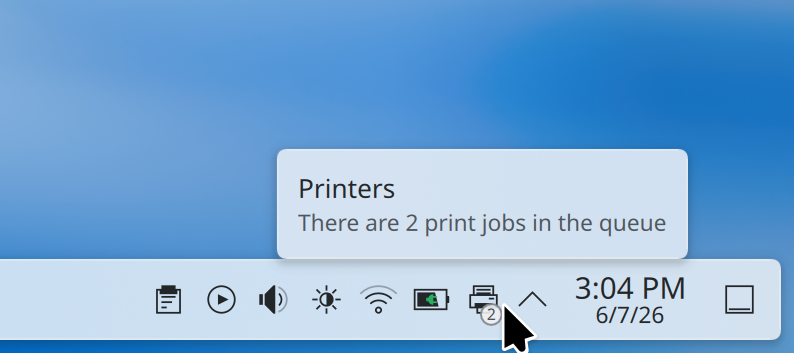
Plasma’s printing support continues to mature. Now the System Tray icon for printers shows the number of active jobs in a little badge.
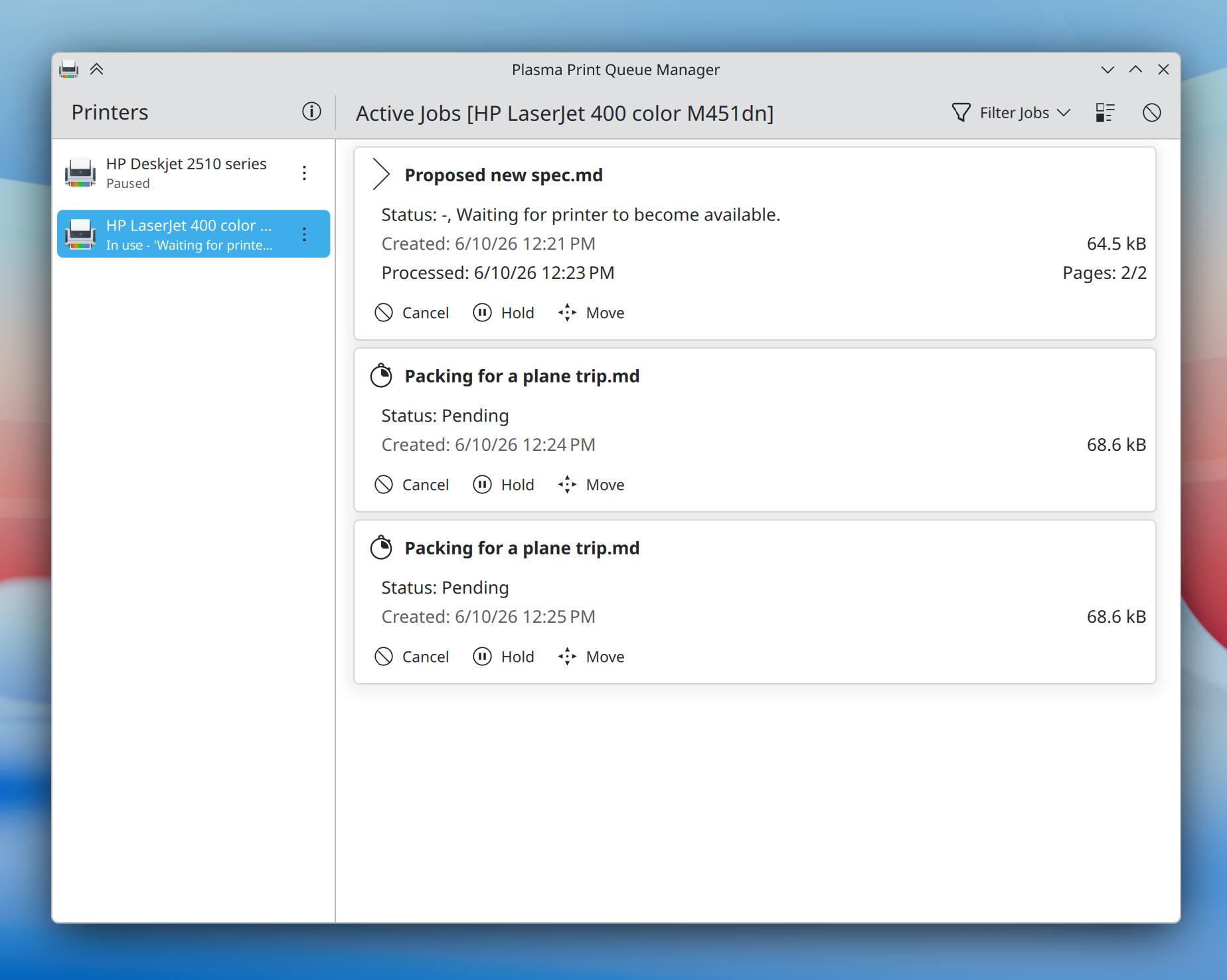
On the enterprise side, Plasma 6.7 makes it substantially easier to connect to shared printers on Windows networks, and a new print queue management tool offers more power than ever before to those administering multiple frequently-used printers — while remaining simple and comprehensible enough for home use, too.
Plasma 6.7 puts a particular focus on refining the desktop experience to make common tasks faster than ever. Here’s just a small assortment:
When you press Meta + W to open the Overview screen, Plasma 6.7 lets you switch virtual desktops simply by scrolling or pressing the Page Up or Page Down keys.
It’s now easier than ever to add or remove favorite apps in the Application Launcher, Application Menu, and Application Dashboard widgets: just drag and drop!
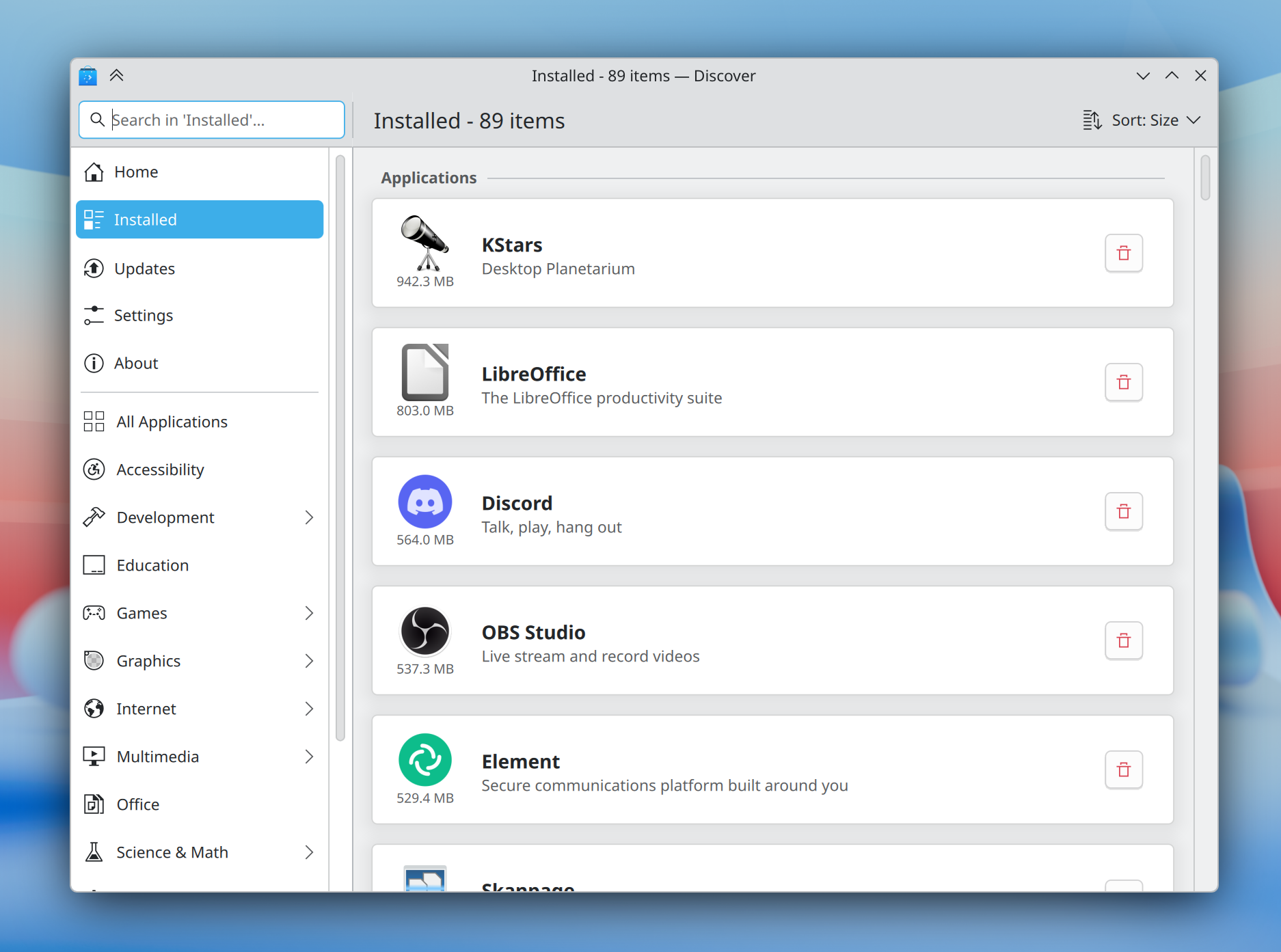
The Discover software center now features a more obvious “Install” button and redesigned app cards with more information, plus a more intuitive sorting order.
In addition, installed software is now grouped by type, making it easier than ever to find what you’re looking for.
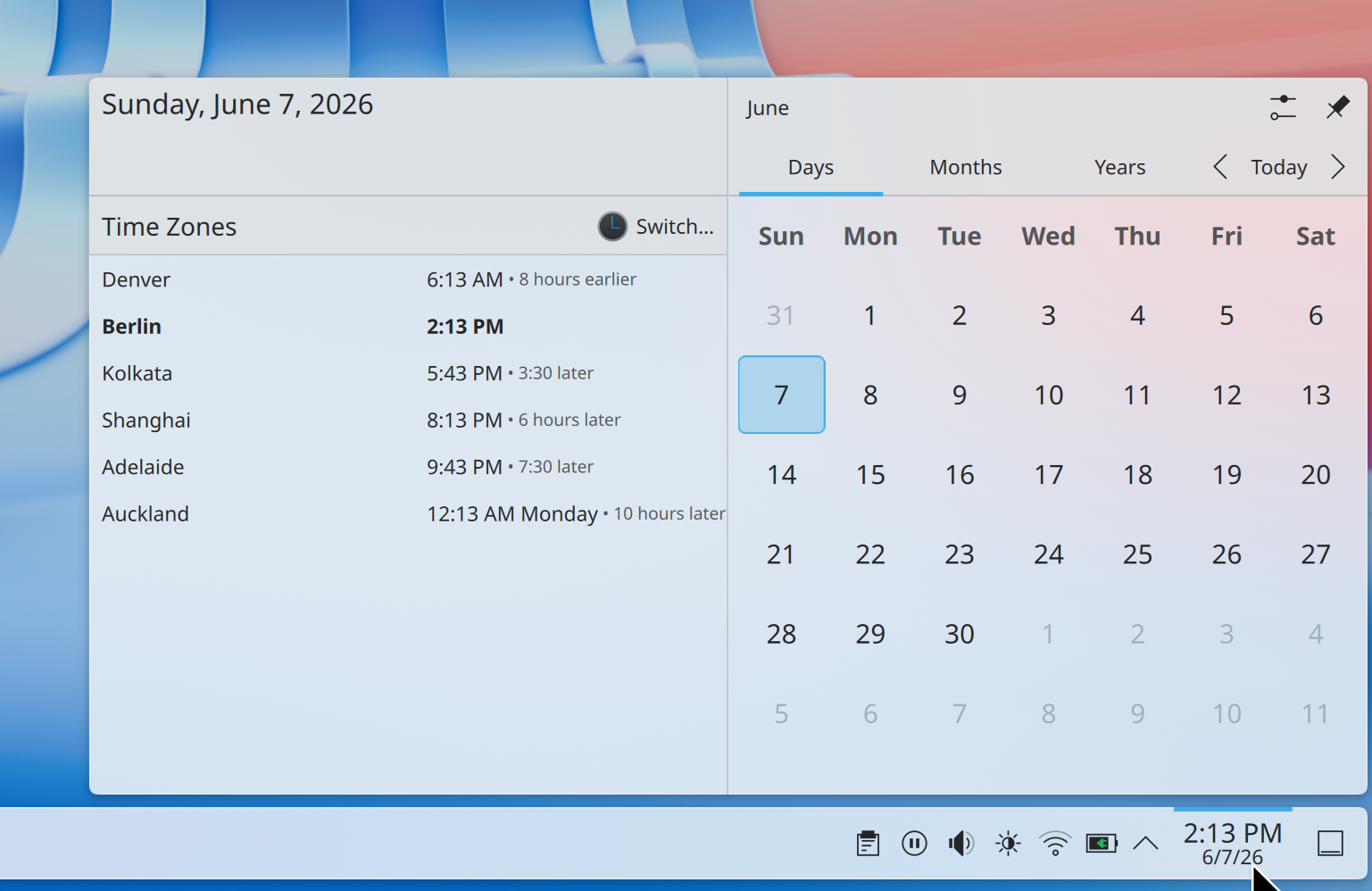
How much earlier is it in Denver if you’re in Berlin? No longer will a question like this require mental gymnastics; Plasma 6.7 makes it easy to see how many hours earlier or later it is in each time zone shown in the Digital Clock widget compared to your local time zone.
For power users, the desktop layout now supports switching to “type-ahead” mode for quickly selecting files when typing on the desktop. You can change this back to activating KRunner if you prefer by Right-clicking on desktop and selecting Desktop and Wallpaper > Icons > Typing on the desktop from the pop-up menu.
In preparation for KDE’s 30th anniversary later this year, we’ve brought the Oxygen theme — used by default in KDE 4 — back up to par with the current Breeze theme.
Air, the Plasma Style providing a light version of Oxygen, has also returned, and we’ve reworked our Global Themes to feature light, dark, and twilight versions. Both Air and Oxygen benefit from a multitude of fixes, improvements, and restorations, including support for adaptive opacity, different panel positions, and more.
The classic KDE 4 Air and Horos wallpapers also make a return.
The default Breeze theme also continues to evolve, now featuring rounded list and grid view highlights for many applications, and visible click effects for menu items.

Plasma’s Notifications have been given a fancier animation: they now slide in from the nearest screen edge. This makes them more visually prominent and less likely to be missed, while at the same time avoiding being too attention-grabbing.
Though Plasma’s theming capabilities are second to none, for years creating those themes has been a difficult and fragmented experience.
Plasma’s all-new Union theming system intends to streamline theming by making it possible to style Plasma, QtQuick apps, and QtWidgets apps all with a single set of easy-to-write CSS — the world’s most popular and documented open standard for this purpose.
Plasma 6.7 marks the inaugural release of Union, here with a tech preview of the QtQuick style.
Union is under heavy development, and hence off by default. To test it out, make sure the union package is installed (name may differ depending on your OS), and select “Union” in System Settings > Colors & Themes > Application Style.
Applications must be restarted in order to use Union, and are expected to look nearly identical to Breeze.
If you’ve found a Union-specific issue, please report it here.
You can find out more about the current state and future plans for Union on its developer’s blog.
Plasma has always offered a superb graphical experience, and 6.7 piles on further improvements.
No longer do you have to choose between color management using an ICC profile or enjoying HDR content; now both are possible at the same time!
In addition, you can now control whether the colors on the screen turn redder at extremely low brightness levels on many AMD laptops.
Finally, the team put a great deal of work into optimization, resulting in better performance and lower power usage for CPU-rendered apps, many full-screen windows, and integrated Intel GPUs.
Plasma 6.7 has even more to offer, including:
To see a high-level overview of all user-facing changes, see the Plasma 6.7 wiki page.
To see the full list of all changes, read the complete changelog.
Plasma 6.7 is dedicated to Eric Laffoon, who passed away in May.
Eric was a longtime supporter of KDE going back decades, offering up his time, money, bug reports, and advocacy.
Eric is sorely missed, and we dedicate this release to him.
Najłatwiejszym sposobem na jego wypróbowanie, jest obraz na żywo uruchomiony z dysku USB. Obrazy Dokera także dają szybki i łatwy sposób na wypróbowanie Plazmy.
Download live images with Plasma Download Docker images with PlasmaDystrybucje utworzyły, lub są w trakcie tworzenia, pakietów wymienionych na naszej stronie wiki.
Note that packages of this release might not be available on all distributions at the time of this announcement.
Strona wiki pobierania pakietuYou can install Plasma directly from source.
Instrukcje społeczności nt. jej zbudowania Strona informacyjna źródełMożesz przekazać nam swoją opinię i uzyskać uaktualnienia na naszych kanałach w mediach społecznościowych.
Discuss KDE on the KDE Forums.
You can provide feedback direct to the developers via the #Plasma Matrix channel, Plasma-devel mailing list or report issues via Bugzilla. If you like what the team is doing, please let them know!
Twoja opinia ma dla nas wielkie znaczenie.
KDE is a Free Software community that exists and grows only because of the help of many volunteers that donate their time and effort. KDE is always looking for new volunteers and contributions, whether it is help with coding, bug fixing or reporting, writing documentation, translations, promotion, money, etc. All contributions are gratefully appreciated and eagerly accepted. Please read through the Supporting KDE page for further information or become a KDE e.V. supporting member through our Join the Game initiative.
KDE is an international technology team that creates free and open source software for desktop and portable computing. Among KDE’s products are a modern desktop system for Linux and UNIX platforms, comprehensive office productivity and groupware suites and hundreds of software titles in many categories including Internet and web applications, multimedia, entertainment, educational, graphics and software development. KDE software is translated into more than 60 languages and is built with ease of use and modern accessibility principles in mind. KDE’s full-featured applications run natively on Linux, BSD, Windows, Haiku, and macOS.
Uwagi do znaku towarowego.
KDE® oraz logo Środowiska Pulpitu K® są zarejestrowanymi znakami towarowymi KDE e.V..
Linux jest zarejestrowanym znakiem towarowym Linusa Torvaldsa. UNIX jest zarejestrowanym znakiem towarowym Otwartej Grupy w Stanach Zjednoczonych i innych państwach.
Wszystkie pozostałe znaki towarowe i prawa autorskie z tego ogłoszenia są własnością ich odpowiednich właścicieli.
Po więcej szczegółów wyślij nam wiadomość: press@kde.org