라이브 이미지
체험해 보는 가장 쉬운 방법은 USB 디스크에서 라이브 이미지를 부팅하는 것입니다. Plasma를 테스트해 보려면 Docker 이미지를 사용할 수도 있습니다.
Plasma 라이브 이미지 다운로드 Plasma Docker 이미지 다운로드2026년 6월 16일 화요일
Plasma 6.7 brings powerful new features to KDE’s classic desktop, and refines its user experience to new levels.
Enjoy thoughtfully-designed improvements that solve real problems, a sneak peek of future theming bliss, better performance, and more.
Read on to learn all about it!
After 21 years, hopefully it will have been worth the wait… per-screen virtual desktops have finally arrived!
No more being told your audio is too loud or quiet, or wondering if it’s your microphone or an app that’s misbehaving.
With Plasma’s virtual keyboard enabled, press and hold a key to type special characters related to it.
In Plasma 6.6, we introduced the ability to create your own Global Themes, and switch between them as part of the day-night cycle. Plasma 6.7 puts you even more in control with a quick toggle to switch between light and dark Global Themes immediately.
Plasma 6.7 adds the Vietnamese lunar calendar to its available set of non-Gregorian calendars. Now you can keep up with dates and events using both calendar systems with more ease than ever!

The System Tray is already the place for monitoring apps running in the background using traditional methods. Plasma 6.7 extends this support by also showing apps using the newer “Background Apps” system, which is more common for apps using the Flatpak package format.
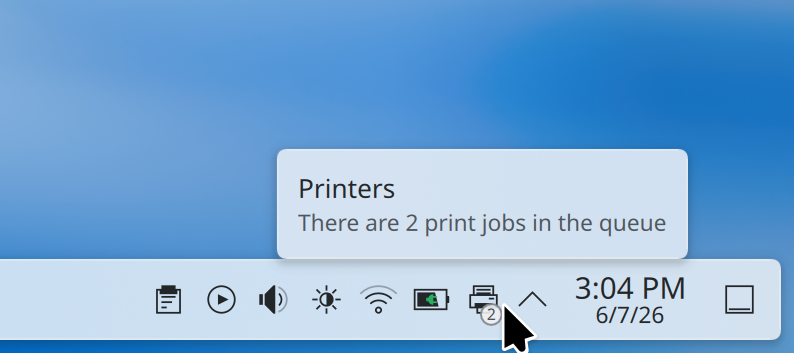
Plasma’s printing support continues to mature. Now the System Tray icon for printers shows the number of active jobs in a little badge.
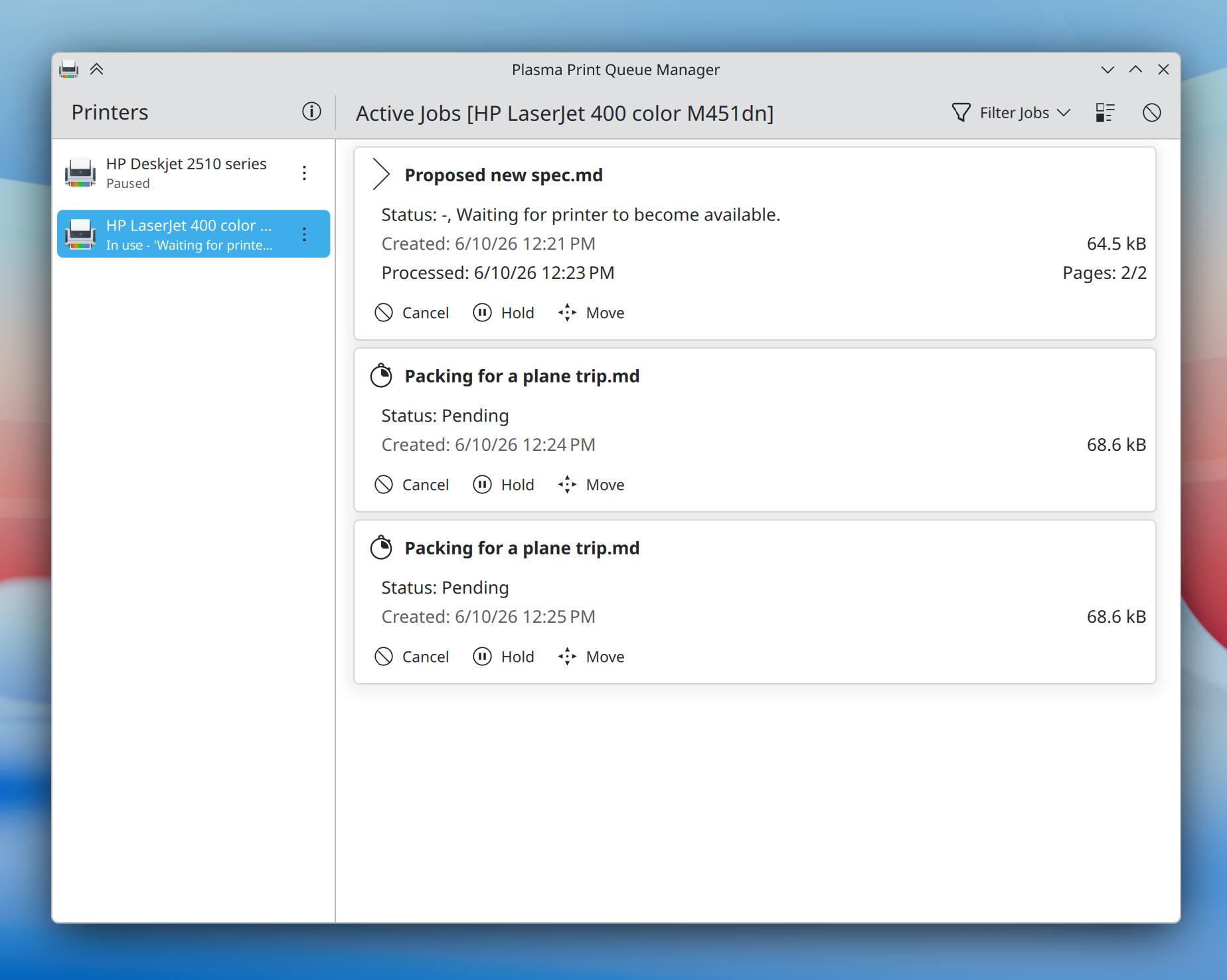
On the enterprise side, Plasma 6.7 makes it substantially easier to connect to shared printers on Windows networks, and a new print queue management tool offers more power than ever before to those administering multiple frequently-used printers — while remaining simple and comprehensible enough for home use, too.
Plasma 6.7 puts a particular focus on refining the desktop experience to make common tasks faster than ever. Here’s just a small assortment:
When you press Meta + W to open the Overview screen, Plasma 6.7 lets you switch virtual desktops simply by scrolling or pressing the Page Up or Page Down keys.
It’s now easier than ever to add or remove favorite apps in the Application Launcher, Application Menu, and Application Dashboard widgets: just drag and drop!
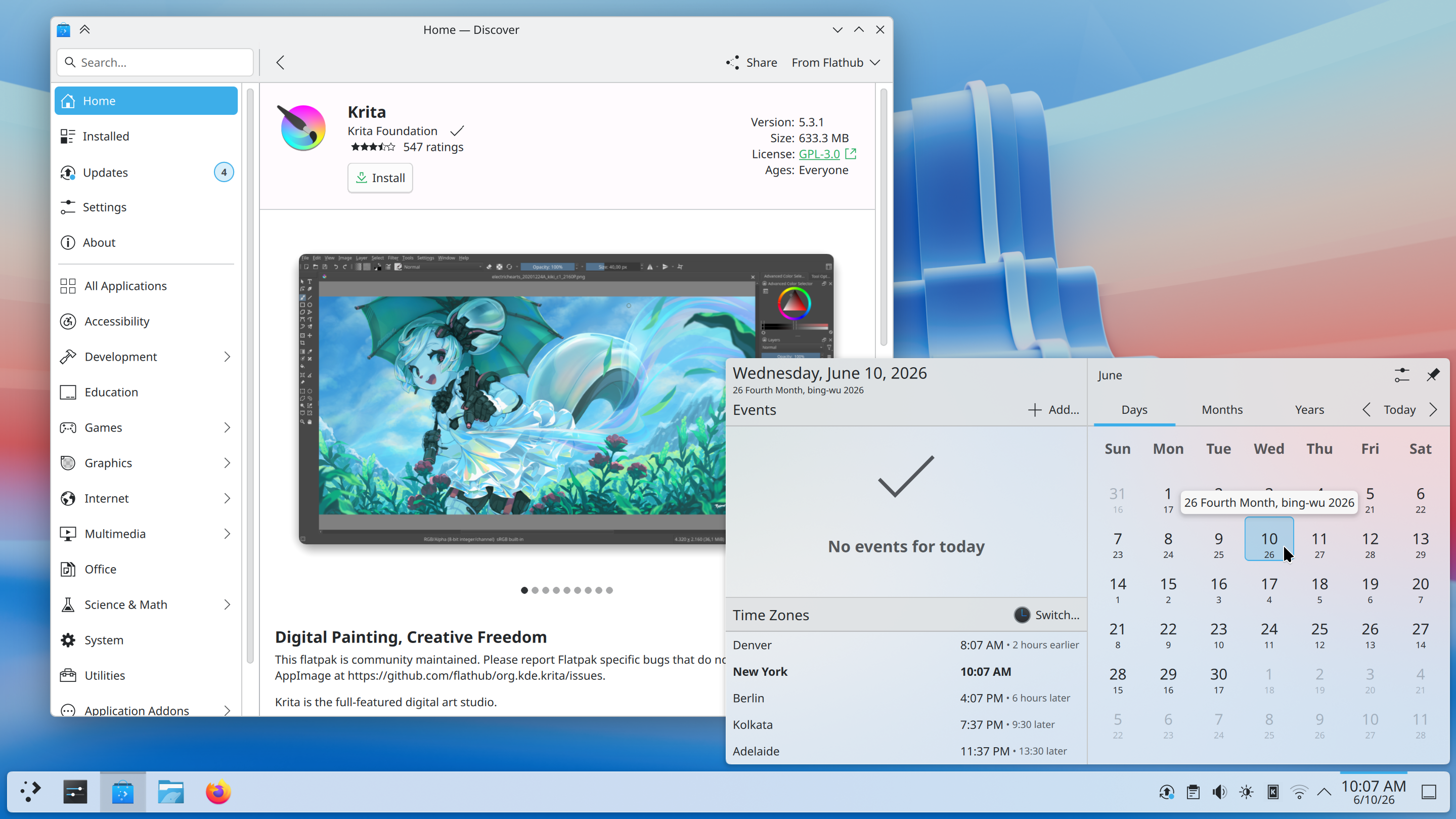
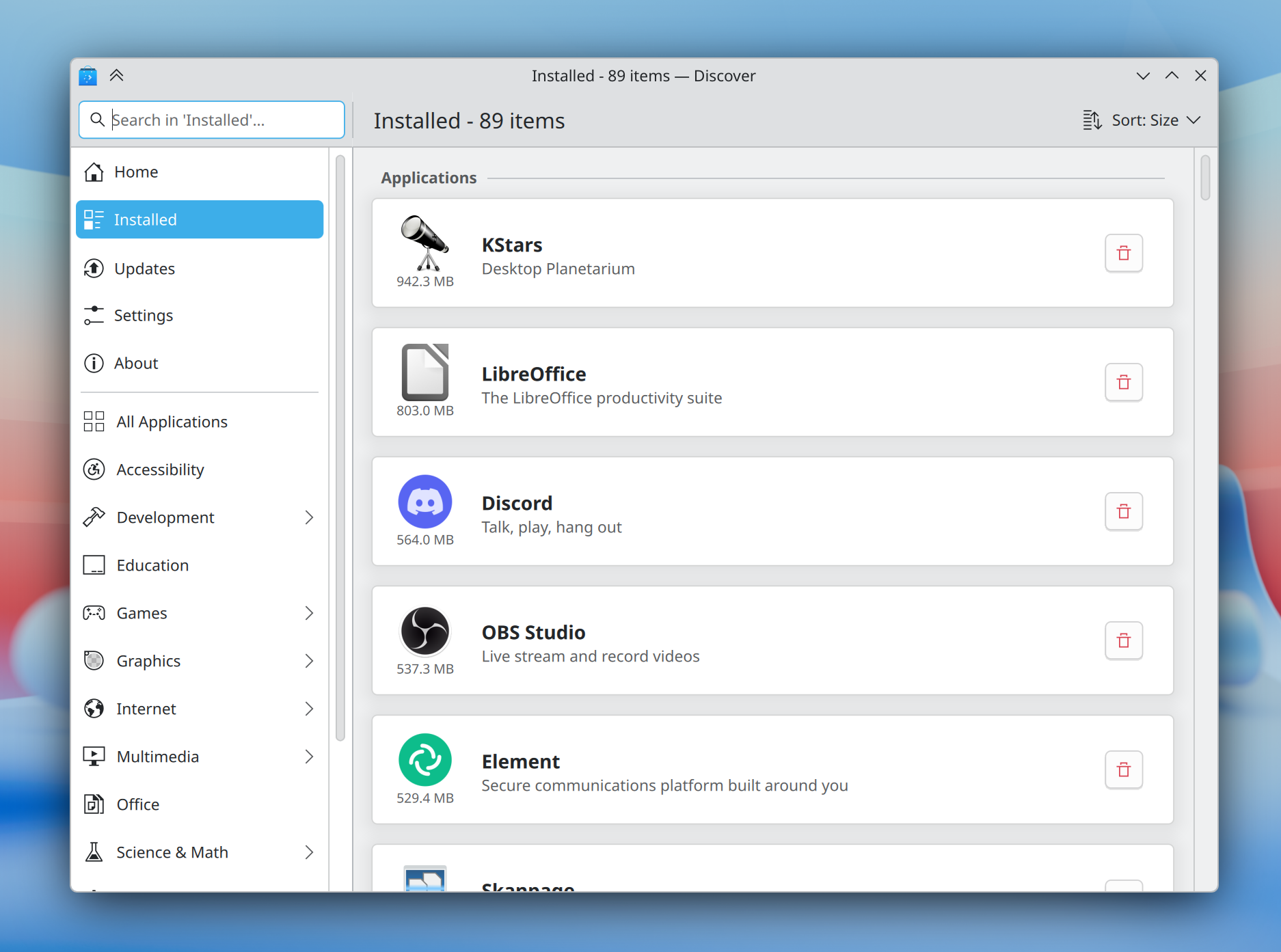
The Discover software center now features a more obvious “Install” button and redesigned app cards with more information, plus a more intuitive sorting order.
In addition, installed software is now grouped by type, making it easier than ever to find what you’re looking for.
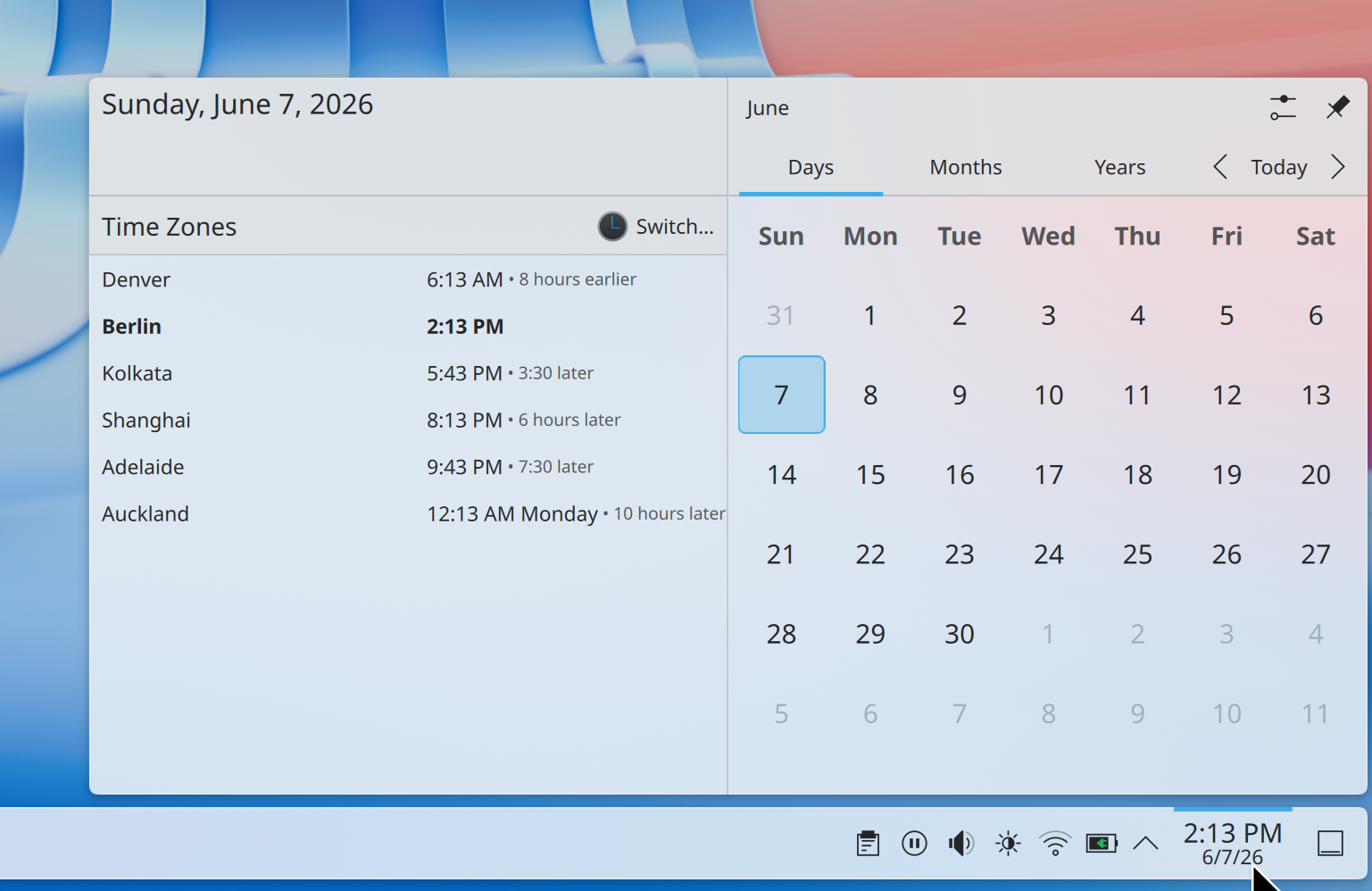
How much earlier is it in Denver if you’re in Berlin? No longer will a question like this require mental gymnastics; Plasma 6.7 makes it easy to see how many hours earlier or later it is in each time zone shown in the Digital Clock widget compared to your local time zone.
For power users, the desktop layout now supports switching to “type-ahead” mode for quickly selecting files when typing on the desktop. You can change this back to activating KRunner if you prefer by Right-clicking on desktop and selecting Desktop and Wallpaper > Icons > Typing on the desktop from the pop-up menu.
In preparation for KDE’s 30th anniversary later this year, we’ve brought the Oxygen theme — used by default in KDE 4 — back up to par with the current Breeze theme.
Air, the Plasma Style providing a light version of Oxygen, has also returned, and we’ve reworked our Global Themes to feature light, dark, and twilight versions. Both Air and Oxygen benefit from a multitude of fixes, improvements, and restorations, including support for adaptive opacity, different panel positions, and more.
The classic KDE 4 Air and Horos wallpapers also make a return.
The default Breeze theme also continues to evolve, now featuring rounded list and grid view highlights for many applications, and visible click effects for menu items.

Plasma’s Notifications have been given a fancier animation: they now slide in from the nearest screen edge. This makes them more visually prominent and less likely to be missed, while at the same time avoiding being too attention-grabbing.
Though Plasma’s theming capabilities are second to none, for years creating those themes has been a difficult and fragmented experience.
Plasma’s all-new Union theming system intends to streamline theming by making it possible to style Plasma, QtQuick apps, and QtWidgets apps all with a single set of easy-to-write CSS — the world’s most popular and documented open standard for this purpose.
Plasma 6.7 marks the inaugural release of Union, here with a tech preview of the QtQuick style.
Union is under heavy development, and hence off by default. To test it out, make sure the union package is installed (name may differ depending on your OS), and select “Union” in System Settings > Colors & Themes > Application Style.
Applications must be restarted in order to use Union, and are expected to look nearly identical to Breeze.
If you’ve found a Union-specific issue, please report it here.
You can find out more about the current state and future plans for Union on its developer’s blog.
Plasma has always offered a superb graphical experience, and 6.7 piles on further improvements.
No longer do you have to choose between color management using an ICC profile or enjoying HDR content; now both are possible at the same time!
In addition, you can now control whether the colors on the screen turn redder at extremely low brightness levels on many AMD laptops.
Finally, the team put a great deal of work into optimization, resulting in better performance and lower power usage for CPU-rendered apps, many full-screen windows, and integrated Intel GPUs.
Plasma 6.7 has even more to offer, including:
To see a high-level overview of all user-facing changes, see the Plasma 6.7 wiki page.
To see the full list of all changes, read the complete changelog.
Plasma 6.7 is dedicated to Eric Laffoon, who passed away in May.
Eric was a longtime supporter of KDE going back decades, offering up his time, money, bug reports, and advocacy.
Eric is sorely missed, and we dedicate this release to him.
체험해 보는 가장 쉬운 방법은 USB 디스크에서 라이브 이미지를 부팅하는 것입니다. Plasma를 테스트해 보려면 Docker 이미지를 사용할 수도 있습니다.
Plasma 라이브 이미지 다운로드 Plasma Docker 이미지 다운로드배포판에서는 패키지 작업을 완료했거나, 패키지 작업을 진행 중입니다. 위키 페이지에서 확인하십시오.
공지 시점에서 이 릴리스의 패키지는 모든 배포판에서 사용할 수는 없습니다.
패키지 다운로드 위키 페이지Plasma를 소스 코드에서 직접 설치할 수 있습니다.
커뮤니티에서 제공하는 컴파일 방법 소스 코드 정보 페이지소셜 미디어 채널을 통해서 피드백을 제공하고 업데이트를 받을 수 있습니다:
KDE 포럼에서 토론할 수 있습니다.
#Plasma Matrix 채널, Plasma-devel 메일링 리스트를 통해서 개발자에게 직접 피드백을 전달하거나, Bugzilla로 문제점을 보고할 수 있습니다. 팀이 하고 있는 일이 마음에 든다면 알려 주세요!
귀하의 피드백을 감사하게 생각합니다.
KDE는 개인의 시간과 노력을 기부하는 것으로 존재하고 성장하는 자유 소프트웨어 커뮤니티입니다. KDE는 코딩, 버그 수정 및 보고, 문서 작성, 번역, 프로모션, 금전적 기여 등 다양한 자원 봉사자와 기여자를 찾고 있습니다. 모든 기여를 환영합니다. 더 많은 정보를 보려면 KDE 지원하기 페이지를 확인하십시오. Join the Game을 통해서 KDE e.V.의 후원 회원이 될 수도 있습니다.
KDE는 데스크톱 및 휴대용 컴퓨팅을 위한 자유 오픈 소스 소프트웨어를 개발하는 국제 기술 팀입니다. KDE의 제품으로는 리눅스 및 유닉스 플랫폼용 현대적인 데스크톱 환경, 강력한 사무용 생산성 도구 및 그룹웨어, 인터넷과 웹 애플리케이션, 멀티미디어, 엔터테인먼트, 교육용 소프트웨어, 그래픽, 소프트웨어 개발 등 여러 분야에 걸친 백 개 이상의 소프트웨어가 있습니다. KDE 소프트웨어는 60여개 이상의 언어로 번역되며 사용 편의성과 접근성을 염두에 두고 개발됩니다. KDE 앱은 리눅스, BSD, Solaris, Windows, Haiku, macOS에서 네이티브 환경으로 실행됩니다.
등록 상표 고지.
KDE®와 K Desktop Environment® 로고는 KDE e.V.의 등록 상표입니다.
Linux는 Linus Torvalds의 등록 상표입니다. UNIX는 미국 및 기타 국가에서 The Open Group의 등록 상표입니다.
이 문서에 언급된 모든 다른 등록 상표와 저작권은 개별 소유자의 지적 자산입니다.
더 많은 정보를 보려면 이메일을 보내 주십시오: press@kde.org