Plasma 5.22 베타: 안정성과 사용 편의성을 향한 도전
2021년 5월 13일 목요일
This is the Beta release of Plasma 5.22. To make sure that end-users have the best possible experience with Plasma 5.22, KDE is releasing today this test version of the software. We encourage the more adventurous to test-run it and report problems so that developers may iron out the wrinkles before the final release scheduled for the 8th of June.
Plasma 5.22 is gearing up to be a leap forward with regards to stability and usability. Developers have concentrated their efforts on ironing out hundreds of bugs and removing paper cuts, while also tweaking details. The aim of Plasma 5.22 is to allow users to become even more productive and enjoy a smoother experience when using KDE's Plasma desktop.
DISCLAIMER: This is beta software and is released for testing purposes. You are advised to NOT use Plasma 5.22 Beta in a production environment or as your daily desktop. If you do install Plasma 5.22 Beta, you must be prepared to encounter (and report to the creators) bugs that may interfere with your day-to-day use of your computer.
Read on to find out more about Plasma 5.22 Beta:
일반 Plasma
- Plasma System Monitor replaces KSysguard as the default system monitoring app
- New adaptive panel transparency feature makes the panel and panel widgets more transparent, but turns off transparency entirely when there are any maximized windows. You can also make your panel always transparent or always opaque if you want.
- The new Kickoff no longer suffers from either an irritating delay before switching categories or accidentally switched categories when moving the cursor
- Support for activities on Wayland
- The Global Menu applet now lets you search through menu items on Wayland
- The Task Manager's "Highlight Windows" feature now only highlights windows when hovering over that window's thumbnail in the tooltip, and this behavior has been turned on by default
- Global shortcuts involving non-Latin symbols of non-US keyboards now work properly
- Hugely improved Wayland support in general
- You can now change the text size in sticky note widgets
System Settings
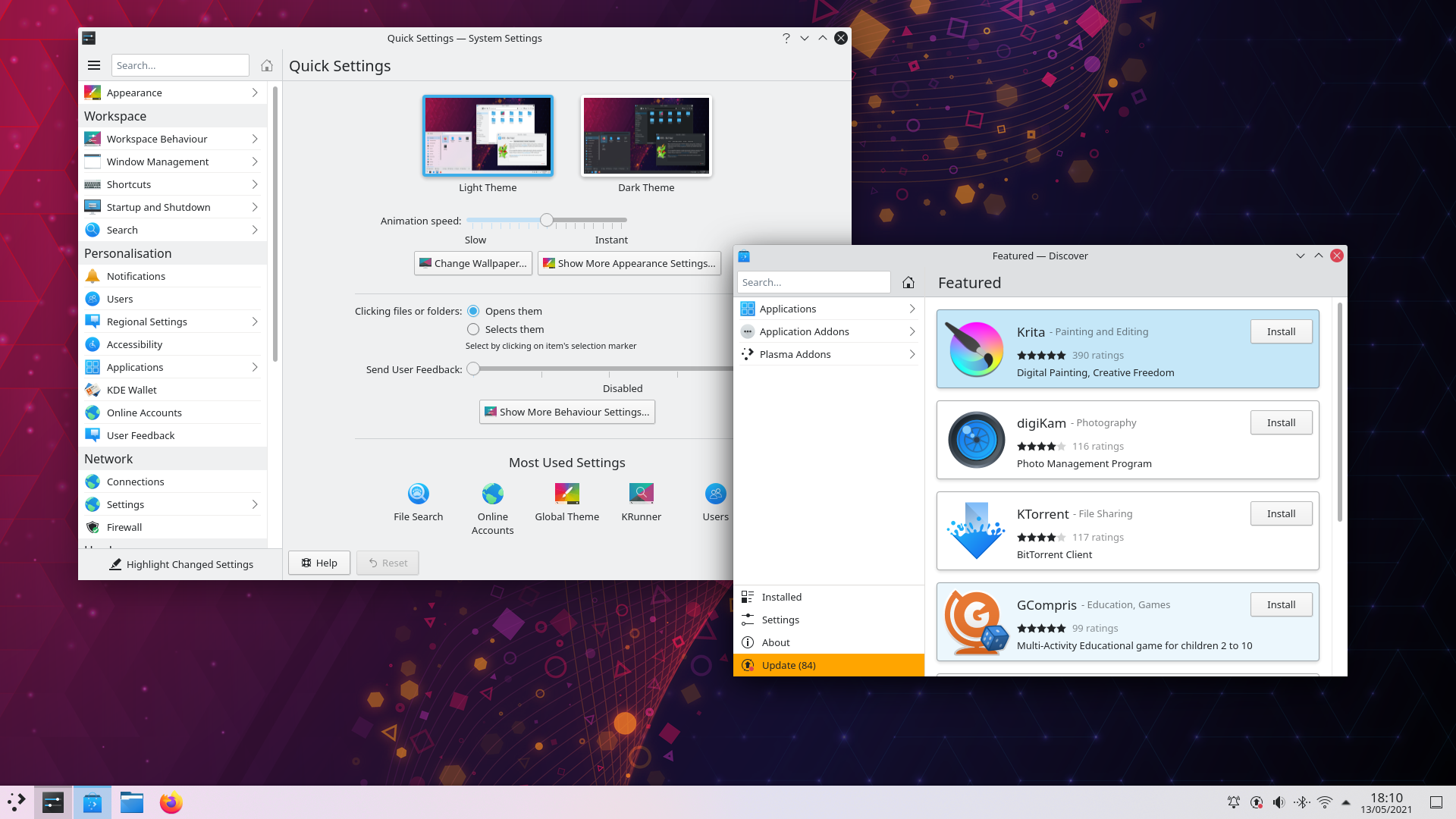
- The app now opens to a new "Quick Settings" page that shows some of the most commonly/frequently changed settings, and offers a link to the place where you can change the wallpaper
- You can now disable offline updates if you're using a distro that has decided to enable them by default, or enable them if you're using a distro that hasn't
- Improved accessibility and keyboard navigability
System Tray
- System Tray applets in general are much more consistent in appearance and usability
- The Digital Clock applet's popup has been re-designed for better aesthetics and usability
- You can now force the Digital Clock applet to display the date on the same line as the time even for tall panels
- You can now select the device profile for your audio devices right from the Audio Volume system Tray applet
- You can now call up your clipboard history at any time by pressing Meta+V
Notifications
- Notifications about files (e.g downloaded files, moved files, etc) now show the app that will open the file if you trigger the "Open" action
- Download notifications now inform you when they've been blocked because you need to tell the browser to really start/continue with the download
- The notification system now automatically activates Do Not Disturb mode by default while you are sharing your screen or screencasting
KRunner
- KRunner can now display multi-line text for search results, which makes dictionary definitions (e.g. type "define food") useful
- KRunner no longer returns duplicate results from across different runners (e.g. searching for "firefox" no longer offers you the option to launch the app as well as run the command-line
firefoxbinary)
KWin/그래픽
- KWin now supports direct scan-out for fullscreen windows run on non-NVIDIA GPUs on Wayland, which improves performance
- KWin now supports variable refresh rate /FreeSync screens on Wayland
- KWin now supports hot-plugging GPUs on Wayland
- KWin now supports setting screens' overscan values on Wayland
- Vertical and horizontal maximization now work on Wayland
- The Present Windows effect is fully activatable on Wayland in all contexts
- On multi-screen setups, new windows now open on the screen where the mouse cursor is located by default
라이브 이미지
체험해 보는 가장 쉬운 방법은 USB 디스크에서 라이브 이미지를 부팅하는 것입니다. Plasma를 테스트해 보려면 Docker 이미지를 사용할 수도 있습니다.
Plasma 라이브 이미지 다운로드 Plasma Docker 이미지 다운로드패키지 다운로드
배포판에서는 패키지 작업을 완료했거나, 패키지 작업을 진행 중입니다. 위키 페이지에서 확인하십시오.
공지 시점에서 이 릴리스의 패키지는 모든 배포판에서 사용할 수는 없습니다.
패키지 다운로드 위키 페이지소스 코드 다운로드
Plasma를 소스 코드에서 직접 설치할 수 있습니다.
커뮤니티에서 제공하는 컴파일 방법 소스 코드 정보 페이지피드백
소셜 미디어 채널을 통해서 피드백을 제공하고 업데이트를 받을 수 있습니다:
KDE 포럼에서 토론할 수 있습니다.
#Plasma Matrix 채널, Plasma-devel 메일링 리스트를 통해서 개발자에게 직접 피드백을 전달하거나, Bugzilla로 문제점을 보고할 수 있습니다. 팀이 하고 있는 일이 마음에 든다면 알려 주세요!
귀하의 피드백을 감사하게 생각합니다.
KDE 지원
KDE는 개인의 시간과 노력을 기부하는 것으로 존재하고 성장하는 자유 소프트웨어 커뮤니티입니다. KDE는 코딩, 버그 수정 및 보고, 문서 작성, 번역, 프로모션, 금전적 기여 등 다양한 자원 봉사자와 기여자를 찾고 있습니다. 모든 기여를 환영합니다. 더 많은 정보를 보려면 KDE 지원하기 페이지를 확인하십시오. Join the Game을 통해서 KDE e.V.의 후원 회원이 될 수도 있습니다.
KDE 정보
KDE는 데스크톱 및 휴대용 컴퓨팅을 위한 자유 오픈 소스 소프트웨어를 개발하는 국제 기술 팀입니다. KDE의 제품으로는 리눅스 및 유닉스 플랫폼용 현대적인 데스크톱 환경, 강력한 사무용 생산성 도구 및 그룹웨어, 인터넷과 웹 애플리케이션, 멀티미디어, 엔터테인먼트, 교육용 소프트웨어, 그래픽, 소프트웨어 개발 등 여러 분야에 걸친 백 개 이상의 소프트웨어가 있습니다. KDE 소프트웨어는 60여개 이상의 언어로 번역되며 사용 편의성과 접근성을 염두에 두고 개발됩니다. KDE 앱은 리눅스, BSD, Solaris, Windows, Haiku, macOS에서 네이티브 환경으로 실행됩니다.
등록 상표 고지.
KDE®와 K Desktop Environment® 로고는 KDE e.V.의 등록 상표입니다.
Linux는 Linus Torvalds의 등록 상표입니다. UNIX는 미국 및 기타 국가에서 The Open Group의 등록 상표입니다.
이 문서에 언급된 모든 다른 등록 상표와 저작권은 개별 소유자의 지적 자산입니다.
보도 연락
더 많은 정보를 보려면 이메일을 보내 주십시오: press@kde.org