KDE Gear מתקיים בזמן התמיכה והתרומות שלך. נשמח לקבל עזרה נוספת בשיפור ובבניית היישומים שלנו דרך טופס התרומה.
KDE Gear 23.04
🛸 New Arrivals 👽
יום חמישי, 20 באפריל 2023
New apps join KDE Gear ⚙️ 23.04 and unlock access to fledgling social media platforms, online video streaming services, podcasts, and much more. This new generation of apps are designed to work both on your computer and mobile phone right out of the box.
But, of course, if you are also looking forward to new versions of the KDE tools you already know and trust, those are here too! Classics like Spectacle, Dolphin, Kdenlive, Kate, and Okular all boast shiny new features, code optimizations, and performance improvements.
Read on to find out what's new and what has been improved in KDE Gear ⚙️ 23.04:

Tokodon
Tokodon brings the Mastodon federated social media platform to your fingertips, allowing you to easily read, post, and message.
With version 23.04, communicating with your fellow Fediverse users is even easier, thanks to new features like the ability to see previous messages when replying and the ability to send polls to your followers. Tokodon's mobile version also features a dedicated search page to streamline the process of finding specific posts.
tokodon.png)
Furthermore, version 23.04 enhances your privacy by allowing you to configure a proxy before logging into your Mastodon account. You can also view a list of follow requests, giving you more control over who you interact with on the Fediverse.

AudioTube
AudioTube brings all the music on YouTube to your desktop. This elegant and minimalistic player has undergone a visual redesign and also sports a smart new icon, as well as improved compatibility on mobile phones.
You can search for music, make playlists, create playlists from your favorite songs, all songs from the playback history, or your most listened songs. You can also share links to your songs with others.
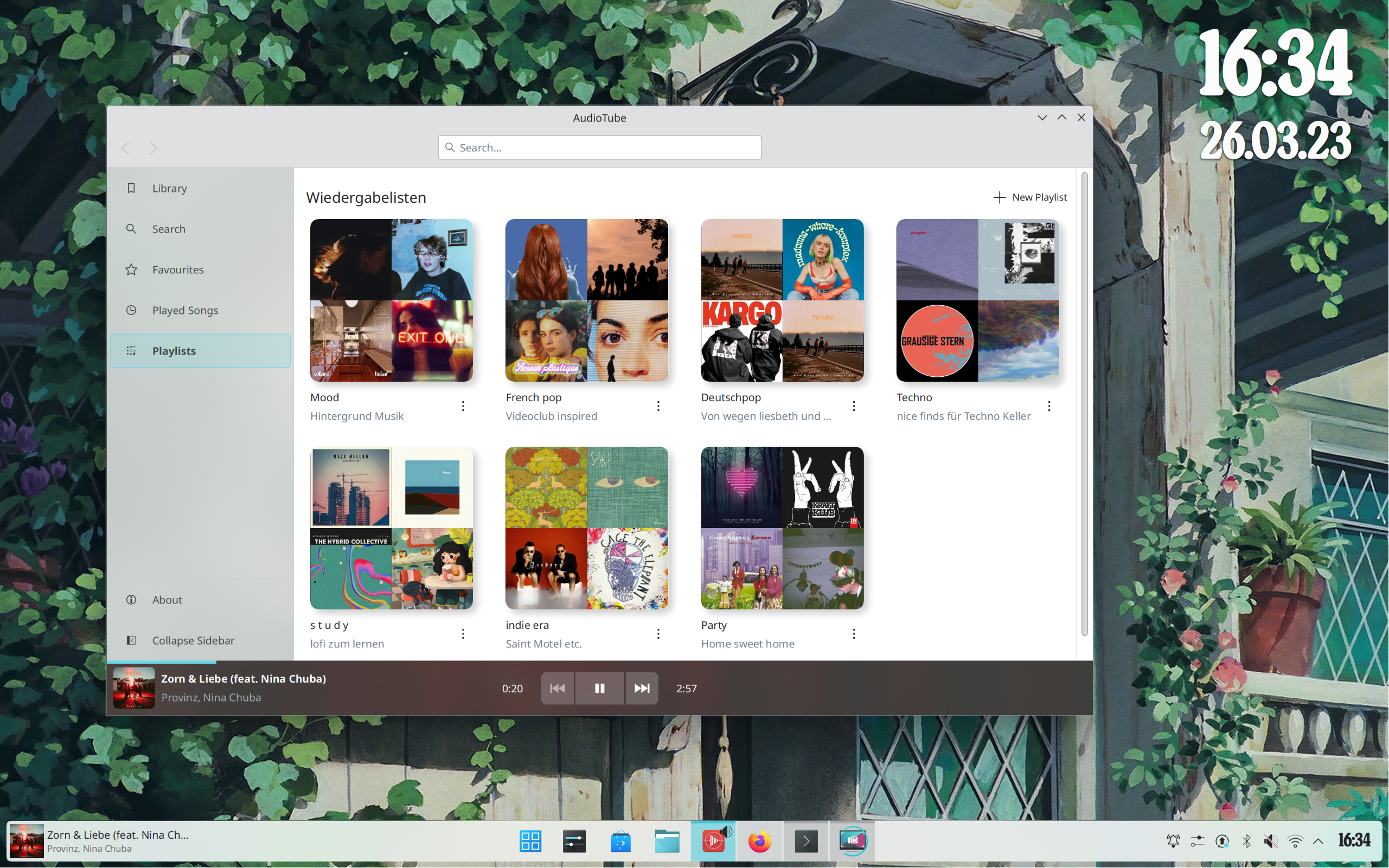
Finally, a major rewrite of parts of the code has made AudioTube lighter than ever.

NeoChat
NeoChat is a native KDE app for chatting on Matrix. NeoChat improves its design with tweaks that provide a more compact layout and a simpler menu which works better for the collapsed room list.
We have also improved the video controls, added a new command /knock <room-id> to send a knock event to a room, and you can now edit a prior message inline, within the chat pane.
Other usability improvements include an overhaul of the keyboard navigation and shortcuts like Ctrl+PgUp/PgDn that allow you to skip from room to room.

Spectacle
Spectacle is KDE's screenshot and screen recorder app. This release features a total redesign of the user interface to make everything faster and easier to use. As part of this redesign, it's now possible to annotate screenshots directly from the rectangular region selection.
spectacle.png)
In addition, Spectacle now offers built-in screen recording functionality on Wayland!
spectacle-new-ui.png)

Dolphin
Dolphin is KDE's versatile and powerful file browser that not only lets you explore your local file system, but also remote servers and devices on the local network.
In the area of file security and privileges, Dolphin now lets you configure how permissions are shown in the Details view. Dolphin has also become more flexible and now supports browsing Apple iOS devices using its native afc:// protocol, file dialogs, and other file management tools. It can display the number of pages in a document in a metadata display, too.
A much-requested feature is the possibility to run Dolphin in superuser mode, giving you full command of the entire file system. As this is quite dangerous, Dolphin does not allow itself to be run with sudo and tells you as much if you try. In this release, Dolphin will now also tells you how you can accomplish this goal in a fully supported matter using the new kio-admin add-on.
dolphin-admin.png)
Despite these added features, Dolphin has not become slower. In fact, its code for counting directory sizes is faster, which improves performance, especially with manually-mounted network shares that aren't detected as such.

Gwenview
Gwenview lets you view your images and do some basic editing and annotations on them.
When running on Plasma Wayland, you can now zoom in and out on images in Gwenview using pinch gestures on your touchpad!
Gwenview 23.04 includes changes that make it more predictable, like inhibiting sleep and screen locking during a slideshow only if it is in the foreground, or zooming smoothly rather than in steps when you use Ctrl + scroll on a touchpad. Finally, we have fixed Gwenview's most commonly-experienced crash, often seen when rotating images quickly.

Elisa
Elisa is a smart and elegant music player available for both your computer and phone on most major platforms.
In this release, Elisa allows you to collapse the large header area for a more streamlined appearance, if that's what you prefer. And now the Frequently Played view is a simple list of songs arranged by play count, doing away with the prior complicated time-based heuristic that was unclear and made the contents look random.
As for playlists, Elisa now supports creating and opening .pls playlist files, and when you ask Elisa to open a playlist file with invalid paths, it skips them, shows you a message explaining what happened, and offers you the possibility to open the file so you can edit it and fix the broken paths.
If listening to the radio is your jam, Elisa now includes more popular stations by default.

Okular
Okular is KDE's feature-rich document viewer.
Following the trend of making KDE apps easier to use without sacrificing their flexibility, Okular's default toolbar layout has been tweaked for greater usability and relevance: now it includes the View Mode menu and the zoom and view buttons on the left side, with the tools on the right side. Additionally, the sidebar itself can now be relocated to either side of the window or un-docked to become a free-floating window.
Another subtle tweak that makes using Okular more pleasurable is the zoom that now works smoothly rather than in steps when you use Ctrl + the scroll on your touchpad or a high-resolution scroll wheel.

filelight.png)

Kdenlive
The big news for KDE's powerful video editor is support for nested timelines. This new feature allows you to select several clips from your tracks, group them together, and then treat the group as one single sequence.
You can edit the sequence, apply effects, and add transitions between nested and regular clips. You can later modify the nested sequence and the whole will update accordingly, making editing even more efficient and flexible.

Kalendar
Kalendar is a modern and highly interactive calendaring and contact management app that works well on your computer and mobile phone. Kalendar has completely re-vamped its address book which is now more functional and easier to use.
kalendar.png)
Additionally, it is now possible to define custom reminder times.

PlasmaTube
PlasmaTube is a video player that allows you to stream YouTube videos directly to your desktop or phone. Apart from overhauling its looks, PlasmaTube now protects your privacy, as it accesses videos through Invidious, a YouTube frontend that does not require a login, blocks tracking and ads and does not require JavaScript.
plasmatube.png)

Itinerary

Itinerary, KDE's travel assistant for computers and mobile phones, comes with a complete redesign of the pages showing your travel information. The new design is easier to navigate, includes more information about your trip, and makes it simpler to use the QR at the airport.

Kasts
Kasts is KDE's podcast app that works both on your computer and mobile phone. Now you can minimize Kasts to the system tray and customize the playback speed of your favorite shows. Another new feature is that you can now search through your catalog of subscribed podcasts.
kasts.png)

Kate
Kate and KWrite can now open each new file you want to edit in its own window, rather than in tabs under one window.
Kate received various improvements to its Language Server Protocol (LSP) support. There is now a Code Formatting plugin that provides a simple way to format your code. Another new feature is the support of LSP Inlay Hints to show virtual text for e.g. parameter name at the call site which can enhance code readability.
Kate now provides a unified diagnostics view that collect the diagnostics from all your plugins.

konsole.png)
...And also this
- Ark is an easy-to-use file compression/decompression tool. The new version comes with a richer welcome screen, and the app now supports extracting Stuffit files.
- Dragon Player is a minimalistic KDE-native video and audio player. Dragon Player has undergone a major overhaul of its looks, including adopting the hamburger menu of many other KDE apps, and a welcome screen. It has also gained a streamlined and more intuitive set of default toolbar buttons.
יומן השינויים המלא מופיע כאן
איפה אפשר להשיג את היישומים של KDE
למרות שאנו תומכים באופן מלא בהפצות שמשיקות את התוכנות שלנו, יישומי KDE Gear 23.04 יהיו זמינים גם בחנויות היישומים הבאות ללינוקס תוך זמן קצר:
אם מעניין אותך לסייע לנו שיותר יישומים של KDE ייקלטו בחנויות היישומים, לתמוך ביותר חנויות יישומים ולשפר את השילוב של היישומים בתהליך הפיתוח שלנו, מחכים לשמוע ממך בחדר השיחה „הכול על היישומים”.

כדאי לשים לב שחבילות של המהדורה הזאת כנראה לא תהיינה זמינות בכל ההפצות עדיין בזמן ההכרזה הזאת. עמוד הוויקי על הורדות של חבילות
הידור KDE Gear
את קוד המקור המלא של KDE Gear אפשר להוריד בחינם. הנחיות להידור ולהתקנה זמינות דרך עמוד המידע של KDE Gear.
על KDE
מיזם KDE מורכב מצוות טכנולוגי בינלאומי שיוצר תוכנה חופשית בקוד פתוח למחשבים ומכשירים ניידים. מבין מוצרי KDE ניתן למצוא מערכת שולחן עבודה מודרנית לפלטפורמות לינוקס ויוניקס, חבילות כלי משרד ושיתוף פעולה צוותי נרחבות ומאות כותרי תוכנה במגוון קטגוריות לרבות יישומי אינטרנט ודפדפנים, מולטימדיה, בידור, חינוך, גרפיקה ופיתוח תוכנה. התוכנות של KDE מתורגמות ללמעלה מ־60 שפות והן נבנות על עקרונות של שימוש פשוט ונגישות מודרנית. היישומים העשירים של KDE רצים באופן טבעי על לינוקס, BSD, Windows, Haiku ו־macOS.
הצהרות סימן מסחר.
KDE® והלוגו של סביבת העבודהK® הם סימני מסחר רשומים של KDE e.V..
לינוקס (Linux) הוא סמל מסחר רשום של לינוס טורבלדס. UNIX הוא סימן מסחר רשום של The Open Group בארצות הברית ובמדינות נוספות.
כל שאר סימני המסחר וזכויות היוצרים שהוזכרו בהצהרה הזאת הם בבעלות בעליהם בהתאמה.
יצירת קשר לעתונאים
למידע נוסף אפשר לשלוח לנו הודעה בדוא״ל: press@kde.org
הכתבה נתרמה על ידי Paul Brown בכפוף לרישיון CC-BY-4.0.