A visual guide to the best desktop in the known universe (according to us)
Plasma 6.6 is all about making your life as easy as possible without sacrificing any of the flexibility
Mardi, 17 Février 2026
Plasma 6.6 makes your life as easy as possible, without sacrificing the flexibility or features that have made Plasma the most versatile desktop in the known universe.
With that in mind, we’ve improved Plasma’s usability and accessibility, and added practical new features into the mix.
Check out what’s new and how to use it in our (mostly) visual guide below:
Principales nouveautés
On-Screen Keyboard
Enjoy this new and improved on-screen keyboard
Spectacle Text Recognition
Extract text from screenshots in Spectacle
Plasma Setup
Set up a user account after the operating system has been installed
Nouvelles fonctionnalités
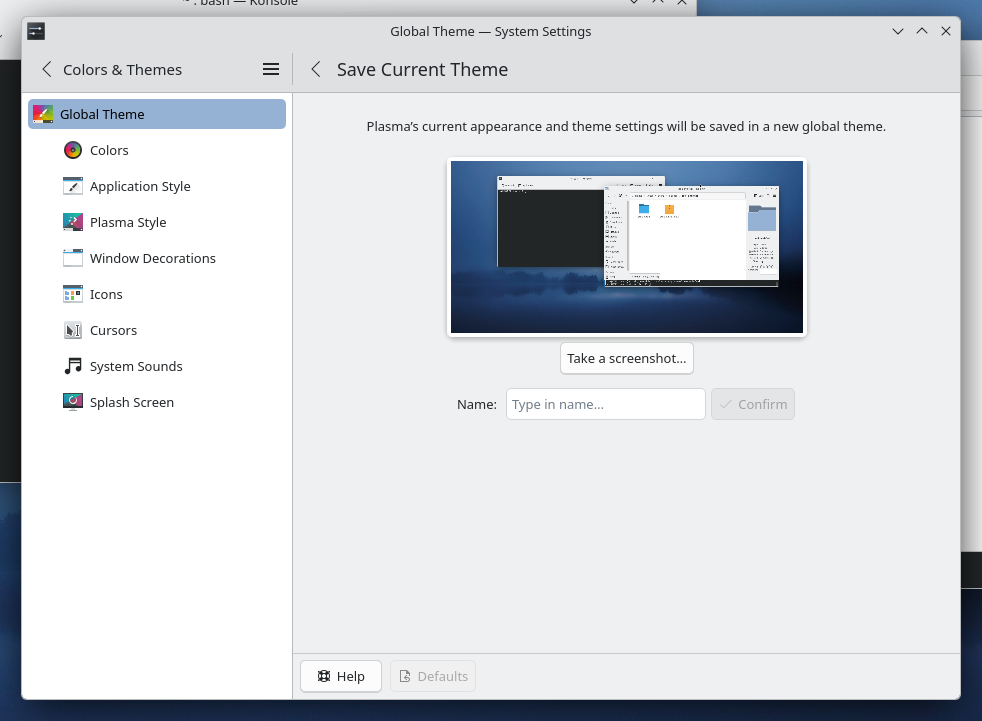
Those who like tailoring the look and feel of their environment can now turn their current setup into a new global theme! This custom global theme can be used for the day and night theme switching feature.
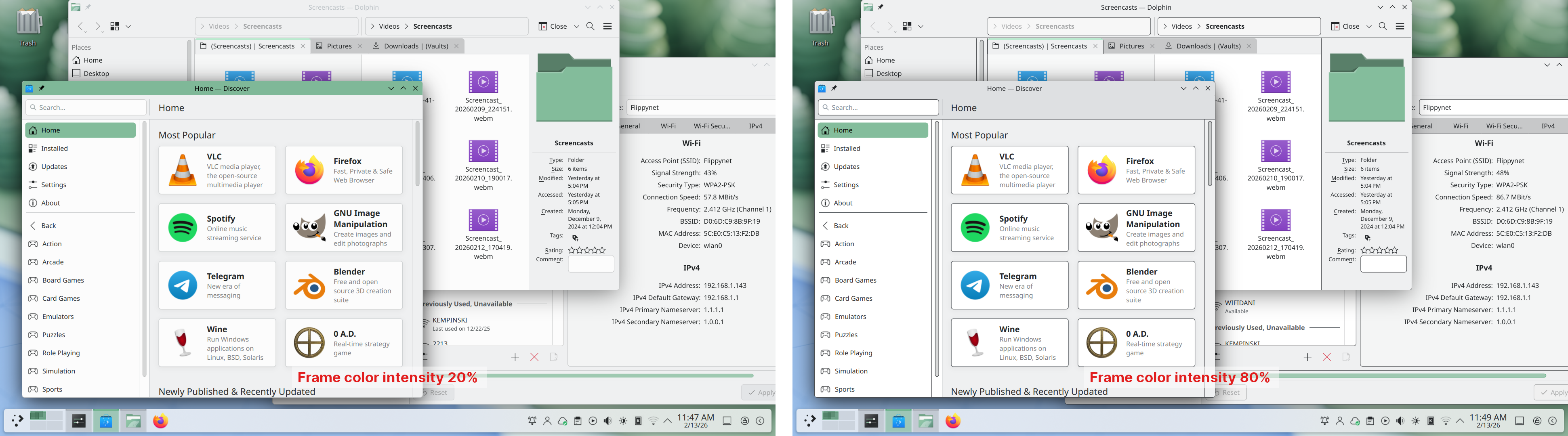
A more subtle way of modifying the look of your apps is by changing the color intensity of every frame:
Choose emoji (Meta+.) skin tones more easily with a new skin tone selector:
A major focus of Plasma 6.6 has been speeding up common workflows. So if the system has a camera, you can quickly connect to a new Wi-Fi network simply by scanning its QR code:
Hover the pointer over any app’s icon playing sound in the task manager, and scroll to adjust its volume:
And save yourself a click by enabling Open on hover in your Windows List widget. You can also filter out windows not on the current desktop or activity:
Hold down the Alt key and double-click on a file or folder on the desktop to bring up its properties:
Accessibilité
To help everyone use and enjoy Plasma, we’ve improved accessibility across the board.
If you have colorblindness, check out the filters on System Settings’ Accessibility page, under Color Blindness Correction. Plasma 6.6. adds a new grayscale filter, bringing the total to four filters that account for different kinds of colorblindness:
Still in the area of enhancements for the visually impaired, our Zoom and Magnifier feature has gained a new tracking mode that always keeps the pointer centered on the screen, bringing the total to four modes:
In addition, we added support for “Slow Keys” on Wayland, and the standardized “Reduced Motion” accessibility setting.
Screenshots and Screen Recording
Speaking of accessibility, Spectacle can now recognize and extract text from images it scans. Among other use cases, this makes it easy to write alt texts for visually-impaired users:
You can also filter windows out of a screencast by choosing a special option from the pop-up menu that appears when right-clicking a window’s title bar:
Virtual Keyboard
Plasma 6.6 also features a new on-screen keyboard! Say hello to the brand-new Plasma Keyboard:
Plasma Setup
Plasma Setup is the new first-run wizard for Plasma, and creates and configures user accounts separately from the installation process.
With Plasma Setup, the technical steps of operating system installation and disk partitioning can be handled separately from user-facing steps like setting up an account, connecting to a network, and so on. This facilitates important use cases such as:
Companies shipping Plasma pre-installed on devices
Businesses or charity organizations refurbishing computers with Plasma to give them new life
Giving away or selling a computer with Plasma on it, without giving the new owner access to the previous owner’s data
But That’s Not All…
Plasma 6.6 is overflowing with goodies, including:
The ability to have virtual desktops only on the primary screen
An optional new login manager for Plasma
Optional automatic screen brightness on devices with ambient light sensors
Optional support for using game controllers as regular input devices
Font installation in the Discover software center, on supported operating systems
Choose process priority in System Monitor
Standalone Web Browser and Audio Volume widgets can be pinned open
Support for USB access prompts and a visual refresh of other permission prompts
In September, we lost our good friend Björn Balazs to cancer.
An active and passionate contributor, Björn was still holding meetings for his Privact project from bed even while seriously ill during Akademy 2025.
Björn’s drive to help people achieve the privacy and control over technology that he believed they deserved is the stuff FLOSS legends are made of.
Björn, you are sorely missed and this release is dedicated to you.
Images directement utilisables
Le moyen le plus simple de l'essayer est d'utiliser une image « Live », démarrée à partir d'un disque « USB ». Les images « Docker » constituent également un moyen rapide et facile de tester Plasma.
Votre retour d'expérience est grandement apprécié.
Soutien à KDE
KDE est une communauté de logiciels libres existant et grandissant grâce à l'aide de nombreux bénévoles, qui donnent de leur temps et de leurs efforts. KDE est toujours à la recherche de nouveaux bénévoles et de nouvelles contributions, qu'il s'agisse de codage, de correction de bogues ou de rapport d'avancement, de rédaction de documents, de traductions, de promotion, d'argent, etc. Toutes les contributions sont appréciées et acceptées avec enthousiasme. Veuillez lire la page « Soutenir KDE » pour plus de détails ou devenez un membre actif de KDE e.V. grâce à notre initiative Rejoindre le jeu.
À propos de KDE
KDE est une équipe technologique internationale créant des logiciels « Open source » et libres pour les ordinateurs de bureau et les ordinateurs portables. Parmi les produits de KDE, il y a un système de bureau moderne pour les plates-formes Linux et UNIX, des suites complètes de logiciels de groupe de travail et de productivité et des centaines de titres de logiciels dans de nombreuses catégories, y compris Internet et applications Internet, multimédia, loisirs, éducation, graphisme et développement de logiciels. Les logiciels de KDE sont traduits dans plus de 60 langues. Ils sont conçus pour être faciles d'utilisation et avec des principes d'accessibilité modernes. Les applications de KDE incluant de nombreuses fonctionnalités s'exécutent en mode natif sur Linux, BSD, Windows, Haiku et macOS.
Avis pour les marques déposées.
Les logos de KDE® et l'environnement de bureau « K »® sont des marques déposées de KDE e.V. Linux est une marque déposée de Linus Torvalds. UNIX est une marque déposée de « Open Group » aux États unis et dans d'autres pays. Toutes les autres marques déposées et licences référencées dans cette annonce sont la propriété de leurs propriétaire respectifs.
Contact de presse
Pour plus d'informations, veuillez nous contacter par courriel : press@kde.org