
KDE Gear ⚙️ 26.08
“Enjoy Shiny Stuff” edition
Thursday, 20 August 2026
Another four months of development and we are back with a brand new batch of apps. In KDE Gear 26.08, you’ll find updates, new features, and great tools to run and enjoy your digital life.
Today we will be examining some of the more interesting changes landing in KDE’s most popular apps.
Let’s get started!
Support KDE! Become a Supporting Member: you can contribute to keeping our projects alive, get your name into our Hall of Fame, and even Adopt an App!
Okular
Okular is KDE’s flagship document reader most commonly used for reading, signing, and annotating PDFs while also being an excellent eBook and comic reader that can also render Markdown.
In this new version, we have reinforced the signing features resulting in the process becoming more secure and streamlined. We have also melded both settings dialogs (Configure Backends and Configure Okular) into one, making everything less confusing.
More visible features include changes to the text selection: a triple click now selects a whole line, and annotations: Okular will automatically include any highlighted or underlined text in an associated note. You can also copy and paste some of your annotations (notes and inline comments) within the same document or onto another.
Dolphin
Dolphin is KDE’s powerful file/folder/server explorer. Version 26.08 goes even further and improves its integration with KDE Connect. When exploring files on your phone from Dolphin, click on the Open KDE Connect button at the top of the window to make the KDE Connect app appear.
If you are browsing a busy directory, open the Filter Bar with Ctrl + i to use plain text, globbing (like you would use with the ls command in the terminal), or Regular Expressions to sort through the files.
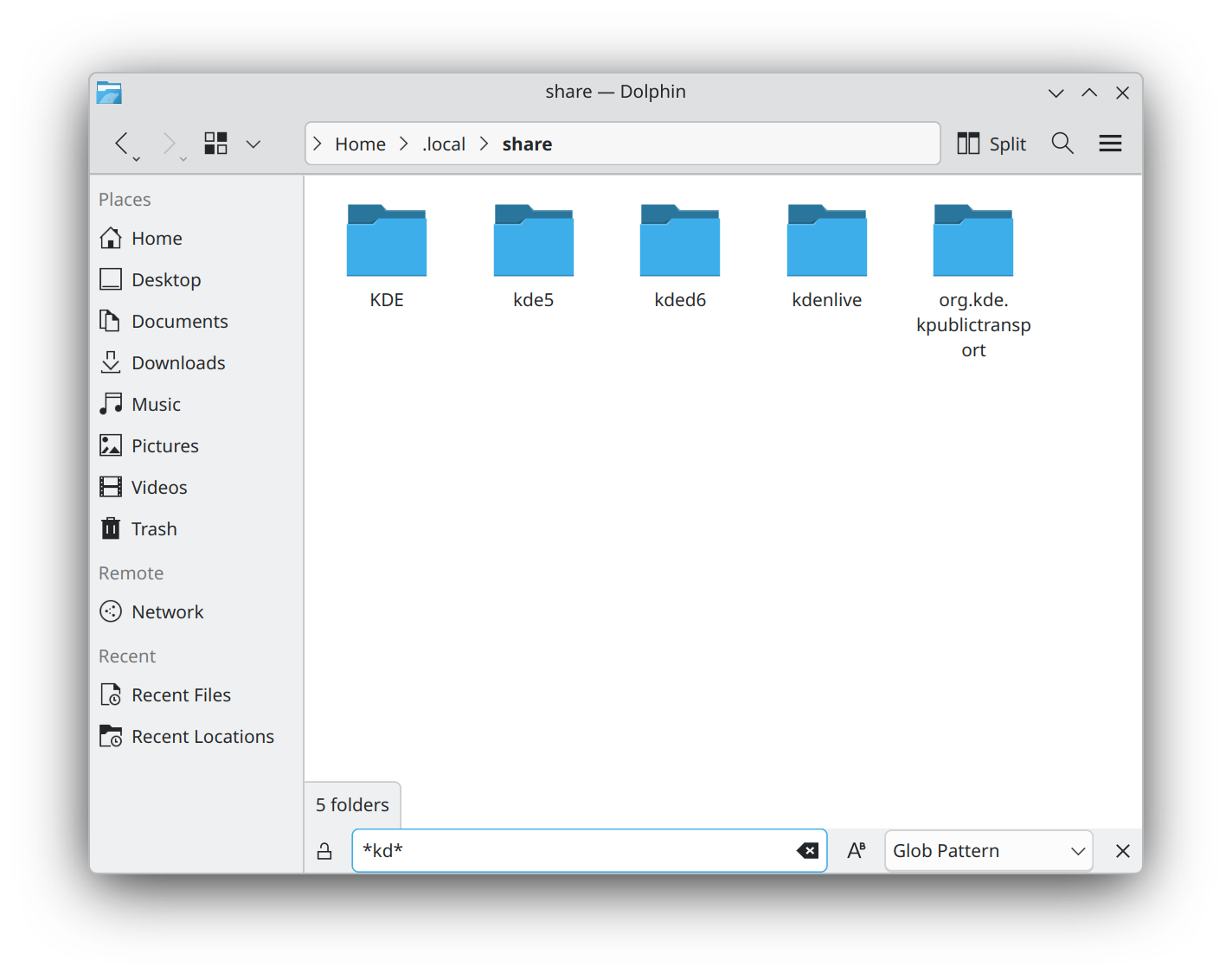
In a similar vein, you can now group files and folders independently from the sorting criterion. This means you can order files alphabetically by name and then group the files by type.
And if the number of tabs you have open gets out of hand, right click on a tab and you can chose to close the tabs to the right, left, or both.
Konsole
Konsole is KDE’s terminal emulator and comes with many features and utilities.
You can now hold down the Alt key, click on an underlined file name, and drag it somewhere else. Also, drag an image onto an image editor to open “Ready for Editing”, drag it onto a text editor and it will copy the path to the file.
The same can now be done with links, email addresses, and color terms too. Drag a link to an empty tab in your browser and it will open the page the link points to. Move the link onto a text editor, and it will download the HTML of the page ready for editing. Drag a color code onto an image in Krita and it will flood the layer with that color. Or drag the same color code onto a text editor and the color’s hexadecimal code will be typed out for you.
Kdenlive
Kdenlive is KDE’s feature-rich video editor. 26.08 comes with lots of quality of life improvements and polishing.
In the effects department for example, you can now move the Transform effect’s rotation axis wherever you want, instead of having it fixed to the center of the item you need to rotate.
The Gradient Map effect now lets you add multiple stops to a gradient, and you can now adjust the curves in the Curves (avfilter) effect independently to the get the color hues you need.
Down on the timeline, you can copy a selection to a new sequence, or have Kdenlive create audio tracks automatically as needed for your clips. You can also reorder tracks and configure different colors for each item type — video, image, title, etc.

In the Titler, you can now copy and paste objects, give rectangles rounded corners, and snap objects to the center and edges of the screen as well as to other items. This feature includes a visual guide to help you.
Minuet
Minuet is KDE’s application for music education. It helps students and musicians train their ears with exercises for intervals, chords, scales, and rhythms.
Minuet has a new interface built to work well on both desktop and mobile screens. The home page and navigation drawer make exercise categories easier to find while making the exercise browser present each activity as a card with a short description. Your current category remains highlighted, and the new search field filters exercises by their translated names and descriptions. Exercise pages have also been reorganized to use the available space better on narrow windows and phones.
Full changelog here
Where to get KDE Apps
Although we fully support distributions that ship our software, KDE Gear 26.08 apps will also be available on these Linux app stores shortly:
If you’d like to help us get more KDE applications into the app stores, support more app stores and get the apps better integrated into our development process, come say hi in our All About the Apps chat room.
Note that packages of this release might not be available on all distributions at the time of this announcement. Package download wiki page
Compiling KDE Gear
The complete source code for KDE Gear 26.08.0 may be freely downloaded. Instructions on compiling and installing are available from the KDE Gear 26.08.0 Info Page.
About KDE
KDE is an international technology team that creates free and open source software for desktop and portable computing. Among KDE’s products are a modern desktop system for Linux and UNIX platforms, comprehensive office productivity and groupware suites and hundreds of software titles in many categories including Internet and web applications, multimedia, entertainment, educational, graphics and software development. KDE software is translated into more than 60 languages and is built with ease of use and modern accessibility principles in mind. KDE’s full-featured applications run natively on Linux, BSD, Windows, Haiku, and macOS.
Trademark Notices.
KDE® and the K Desktop Environment® logo are registered trademarks of KDE e.V..
Linux is a registered trademark of Linus Torvalds. UNIX is a registered trademark of The Open Group in the United States and other countries.
All other trademarks and copyrights referred to in this announcement are the property of their respective owners.
Press Contacts
For more information send us an email: press@kde.org